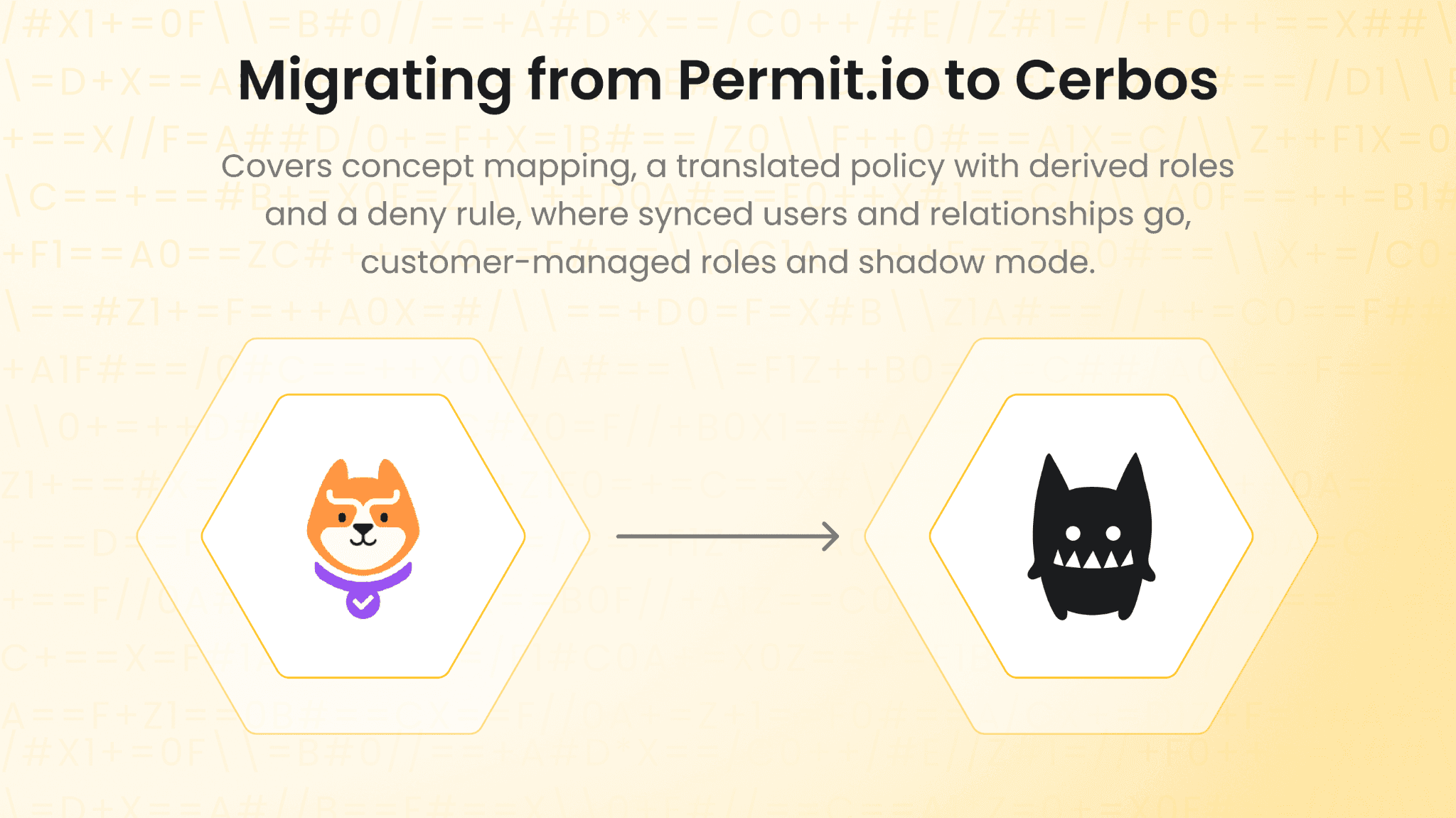
This guide is for teams moving authorization from Permit.io to the Cerbos authorization management platform. You keep your enforcement points, the places in your code and gateways that ask for a decision. What changes is where the policy lives, which becomes readable files your reviewers approve, and where decision data comes from, which becomes the systems that already own it instead of a copy synced into Permit.
Most teams move one service at a time, with Cerbos running beside Permit until the decisions match. Nothing has to stop while you do it.
Why migrating from Permit.io is mostly an authoring and data question
Your application already asks a yes or no question at each enforcement point, and Cerbos answers the same question. So the code changes are small.
In Permit.io, the source of truth is a model in Permit's control plane (resources, roles, relationships and condition sets), and Permit generates Rego from it. In Cerbos, the source of truth is the policy file. So the job is to re-express the rules your Permit model encodes as Cerbos policies, with tests, and not to convert the generated code line by line.
Permit's decision points also answer from a synced copy of your users, role assignments, tenants and relationships. Cerbos decision points hold no copy. For every piece of data your Permit setup syncs today, you decide whether the application sends it with the request or Cerbos Synapse fetches it from where it lives. Most of the migration plan is that list.
What replaces Permit.io after you migrate
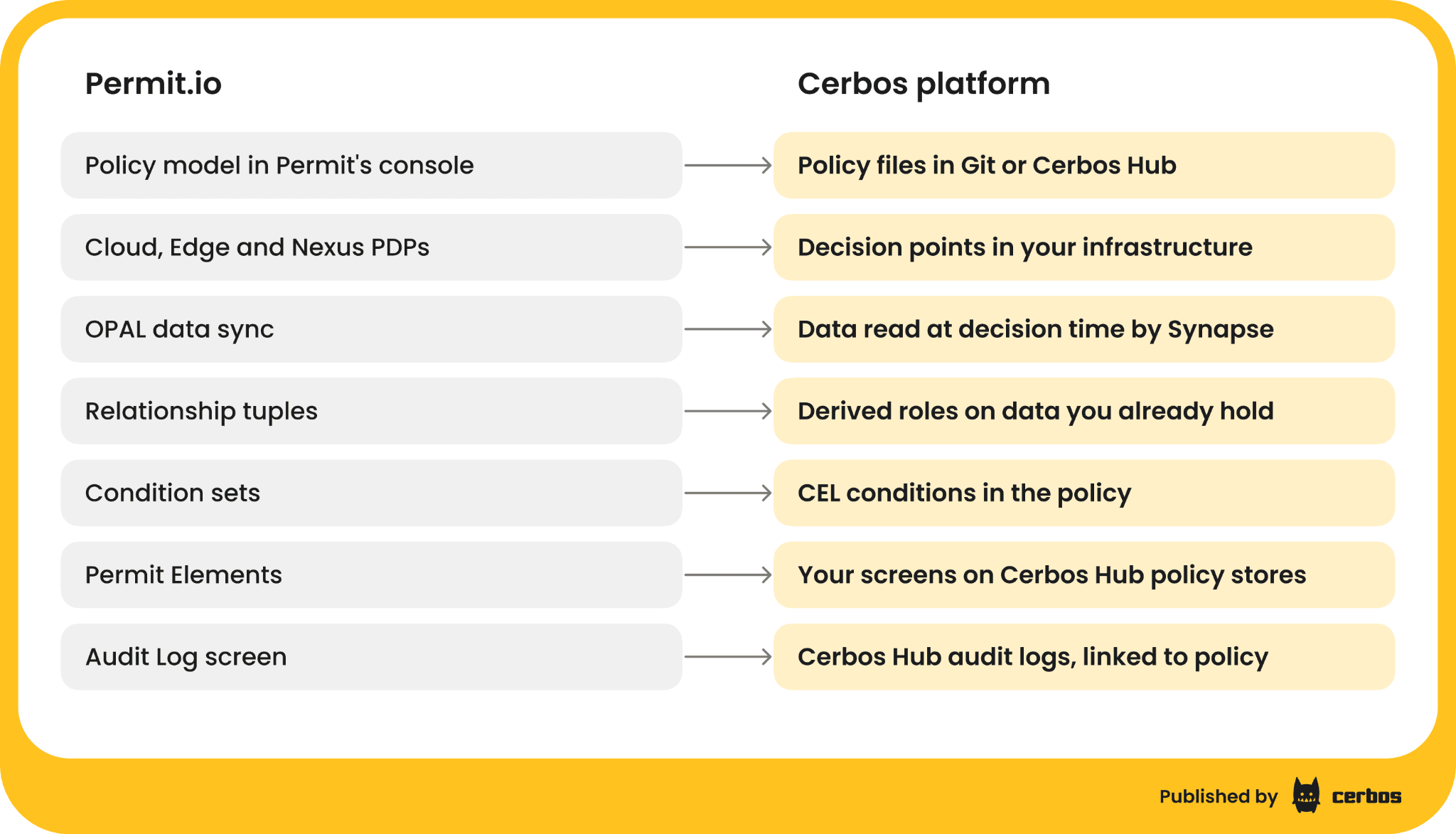
Cerbos is one platform, and each part of it takes over something Permit.io does today.
-
Decision points run next to every workload, as a service, sidecar, DaemonSet or serverless function. They replace Permit's Cloud PDP, Edge PDP and Nexus PDP, and the same policies, with roles, attribute conditions and derived roles, run on all of them.
-
Cerbos Hub replaces Permit's control plane. It builds and tests policies, distributes them to every decision point, keeps the build history and collects audit logs. It runs hosted, or on-premise for enterprise customers.
-
Cerbos Synapse replaces the data sync. It fetches identity, relationship and resource data at decision time from your identity provider, databases and APIs, and it connects gateways such as Envoy and Istio, data platforms such as Trino and Kafka, and AI agents.
-
Role management built into your own product, on the Cerbos Hub API and policy stores, replaces Permit Elements.
Key Cerbos principles to know before you translate
Policies are resource-centric. Each resource type, such as a document, an invoice or an account, has one resource policy listing who can take which action and under what condition.
Everything is denied unless a rule allows it, and a deny rule wins over an allow. You can write "never delete a document on legal hold" as a rule in the same file as everything else, which Permit's policy editor cannot express without custom Rego.
Relationships become derived roles. A derived role turns a relationship into a role at decision time, so "member" plus "admin of this document's folder" becomes "folder admin" for that request.
The decision point holds no data. Everything a rule needs arrives with the request or through Cerbos Synapse. Cerbos decision points are stateless, so they do not grow with your user base.
Policies are readable and tested. Conditions are written in CEL, and policies ship with test suites that run before they can reach a decision point.
Permit.io to Cerbos concept mapping
| Permit.io | Cerbos | Notes |
|---|---|---|
| Resource type with actions | Resource policy | One policy per resource type, actions listed in its rules |
| Top-level role (RBAC) | Role on the principal, used in roles |
Roles come from your identity provider or your own data, sent with the request |
| Tenant | A tenant attribute checked in a derived role, or scoped policies per tenant | Scoped policies let one tenant override a base rule without touching the others |
Role assignment per tenant (assignRole) |
A principal attribute, such as a map of tenant to role | Read from your database or token, no assignment API to sync to |
Resource role (folder#admin) |
Derived role | Defined once and imported into the resource policies that use it |
Relationship tuple (folder:finance parent of document:q3) |
A resource attribute, sent by the application or fetched by Cerbos Synapse | The relationship stays in the system that owns it |
| Role derivation | Derived role with a condition on the relationship | For example P.id in R.attr.folderAdmins |
| User set and resource set (ABAC condition sets) | A CEL condition on the rule | For example P.attr.department == "legal" && R.attr.type == "contract" |
| Custom Rego through GitOps | The same rule in the policy file, including deny rules | No separate custom policy path |
syncUser and user attributes |
Principal attributes on the request | Nothing to sync before the first check |
permit.check() |
checkResource or checkResources |
Several resources and actions in one call |
| Data filtering, Prisma extension | Query plans with adapters for Prisma, Drizzle, Mongoose, Convex, SQLAlchemy and LangChain with ChromaDB | Same policy decides the single check and the list |
| Projects and environments | Cerbos Hub workspaces, policy stores and deployments | Each deployment is a tested, versioned build |
| Permit Elements | Your own screens, writing to per-tenant Cerbos Hub policy stores through the Hub API and SDKs, or to your own role data | Every change versioned and tested |
| Audit Log screen and logs forwarder | Decision logs collected by Cerbos Hub from every decision point, filterable and exportable | Retention by plan, up to custom on Enterprise |
| MCP gateway | Cerbos Synapse checking each MCP tool call down to its arguments | Same policies as your applications and gateways |
| Terraform provider and Permit CLI | Policies in Git, cerbosctl and the Cerbos Hub API |
A worked example of translating a Permit.io policy to Cerbos
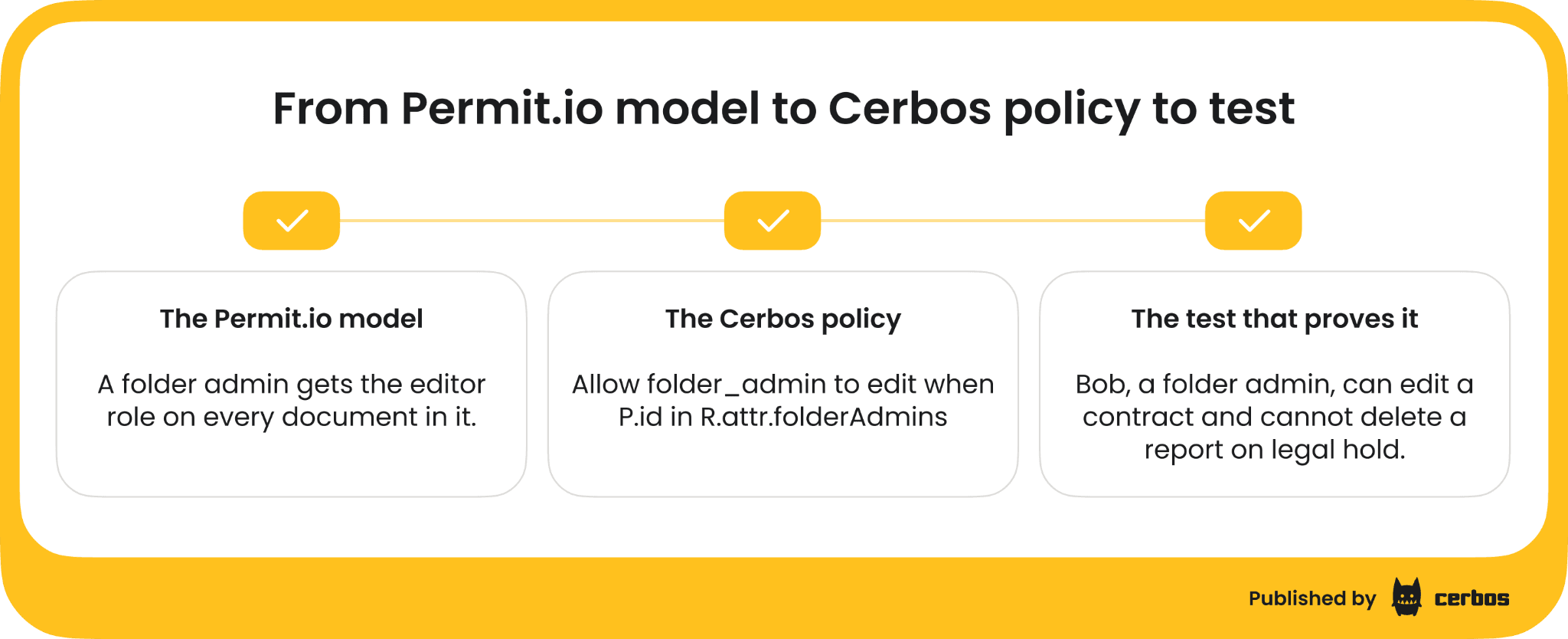
Here is a document model typical of a multi-tenant SaaS product on Permit.io. Each customer is a tenant. Every member of a tenant can read that tenant's documents. An admin of a folder gets the editor role on every document in it, through a relationship tuple and a role derivation. A user set, "legal team", can approve documents in a resource set, "contracts". And the business wants one more rule the Permit policy editor cannot express on its own, never delete a document on legal hold.
In Cerbos that is two short files. The derived roles turn tenant membership and folder administration into roles at decision time.
# derived_roles/document_roles.yaml
apiVersion: api.cerbos.dev/v1
derivedRoles:
 name: document_roles
 definitions:
   # A member of the tenant that owns the document
   - name: tenant_member
     parentRoles: ["member"]
     condition:
       match:
         expr: R.attr.tenant == P.attr.tenant


   # An admin of the folder that contains the document
   - name: folder_admin
     parentRoles: ["member"]
     condition:
       match:
         all:
           of:
             - expr: R.attr.tenant == P.attr.tenant
             - expr: P.id in R.attr.folderAdmins
The resource policy holds every rule for documents, including the deny rule.
# resources/document.yaml
apiVersion: api.cerbos.dev/v1
resourcePolicy:
 resource: document
 version: default
 importDerivedRoles: ["document_roles"]
 rules:
   # Tenant members read their own tenant's documents
   - actions: ["read"]
     effect: EFFECT_ALLOW
     derivedRoles: ["tenant_member"]


   # Folder admins edit and delete documents in their folders
   - actions: ["edit", "delete"]
     effect: EFFECT_ALLOW
     derivedRoles: ["folder_admin"]


   # The legal team approves contracts in its own tenant
   - actions: ["approve"]
     effect: EFFECT_ALLOW
     derivedRoles: ["tenant_member"]
     condition:
       match:
         all:
           of:
             - expr: P.attr.department == "legal"
             - expr: R.attr.type == "contract"


   # Nobody deletes a document on legal hold
   - actions: ["delete"]
     effect: EFFECT_DENY
     roles: ["*"]
     condition:
       match:
         expr: R.attr.legalHold == true
The folder relationship arrives as folderAdmins on the document, sent by the application or fetched by Cerbos Synapse from the table that already records who administers each folder. Nothing is written into a separate relationship store first.
Port the tests before you port anything else
The decisions you know must hold today are the definition of a correct migration. Write them as a Cerbos test suite first, then make the policies pass.
# tests/document_test.yaml
name: DocumentTestSuite
principals:
 alice:
   id: alice
   roles: ["member"]
   attr:
     tenant: acme
     department: legal
 bob:
   id: bob
   roles: ["member"]
   attr:
     tenant: acme
     department: engineering
 eve:
   id: eve
   roles: ["member"]
   attr:
     tenant: globex
     department: legal
resources:
 contract:
   kind: document
   id: doc-1
   attr:
     tenant: acme
     type: contract
     folderAdmins: ["bob"]
     legalHold: false
 held_report:
   kind: document
   id: doc-2
   attr:
     tenant: acme
     type: report
     folderAdmins: ["bob"]
     legalHold: true
tests:
 - name: Members read only their own tenant's documents
   input:
     principals: ["alice", "eve"]
     resources: ["contract"]
     actions: ["read"]
   expected:
     - principal: alice
       resource: contract
       actions:
         read: EFFECT_ALLOW
     - principal: eve
       resource: contract
       actions:
         read: EFFECT_DENY
 - name: Folder admins edit and delete, except documents on legal hold
   input:
     principals: ["bob"]
     resources: ["contract", "held_report"]
     actions: ["edit", "delete"]
   expected:
     - principal: bob
       resource: contract
       actions:
         edit: EFFECT_ALLOW
         delete: EFFECT_ALLOW
     - principal: bob
       resource: held_report
       actions:
         edit: EFFECT_ALLOW
         delete: EFFECT_DENY
 - name: Only the legal team approves contracts
   input:
     principals: ["alice", "bob"]
     resources: ["contract"]
     actions: ["approve"]
   expected:
     - principal: alice
       resource: contract
       actions:
         approve: EFFECT_ALLOW
     - principal: bob
       resource: contract
       actions:
         approve: EFFECT_DENY
Run cerbos compile on the policy folder locally or in CI, and Cerbos Hub runs the same tests on every change and only builds a deployment when they pass.
Getting your rules out of Permit.io
Start with an inventory, not a conversion. Permit's CLI can export an environment as a Terraform file, and the API lists resources, roles, role derivations, condition sets, tenants and relationship tuples. If you use Permit's GitOps sync, the generated Rego is in your repository too.
Use all of it as a reference for what the rules are. Write the rules in plain words first, one resource type at a time, agree them with the person who owns that resource, then write the Cerbos policy and its tests. Generated code repeats the structure of Permit's model, and translating it line by line carries that structure into a format where you do not need it.
If your team works with an AI coding agent, the Cerbos agent skills help with the rewrite. Install them with npx skills add cerbos/skills, give the agent your list of rules in plain words, and it writes each rule as a Cerbos policy with a test suite and runs the tests until they pass. Your reviewers still approve every policy before it ships.
Where your Permit.io data goes after the migration
List every piece of data your Permit setup syncs, and decide who supplies it from now on.
-
Users and their attributes (
syncUser). Send them with the request from the identity token or your user table. Nothing has to exist in a second system before the first check. -
Role assignments per tenant (
assignRole). Read them from wherever your application already stores membership, and send them as a principal attribute, such as a map of tenant to role. The pattern is in our post on self-service custom roles. -
Relationships (relationship tuples). Send the relationship the rule needs, such as the folder's admins or the account's manager, with the resource. Where the application does not have it, a Cerbos Synapse data source queries it from the database that holds it at decision time, with a cache set to how often it changes. We walk through that for org and regional hierarchies.
-
Resource attributes (resource instances). Send them from the record the application already loaded.
For each item, write down the source and how stale it is allowed to be. That list is also what your audit team will want to see, and once it exists, the code that kept Permit in sync can be retired.
Replacing Permit.io calls with Cerbos
Keep every enforcement point where it is, and change what it calls. In Permit, a check names the user, the action and the resource.
// Before, with the Permit.io SDK
const allowed = await permit.check(
 { key: "bob", attributes: { department: "engineering" } },
 "edit",
 { type: "document", key: "doc-1", tenant: "acme" }
);
In Cerbos the call carries the attributes the policy needs, through one of the SDKs available in eight languages plus Laravel.
// After, with the Cerbos SDK
import { GRPC } from "@cerbos/grpc";


const cerbos = new GRPC("cerbos:3593", { tls: false });


const decision = await cerbos.checkResource({
 principal: {
   id: "bob",
   roles: ["member"],
   attr: { tenant: "acme", department: "engineering" },
 },
 resource: {
   kind: "document",
   id: "doc-1",
   attr: { tenant: "acme", type: "contract", folderAdmins: ["bob"], legalHold: false },
 },
 actions: ["edit", "delete"],
});


if (decision.isAllowed("edit")) {
 // open the editor
}
Bulk checks become one checkResources call with several resources and actions. List endpoints that used Permit's data filtering or Prisma extension use a Cerbos query plan, which returns a filter derived from the same policy, turned into a query by an adapter for your ORM. Gateways move to Cerbos Synapse as the external authorization service for Envoy and Istio. MCP tool calls that went through Permit's MCP gateway are checked by Cerbos Synapse, down to the arguments, against the same policies as everything else.
Replacing Permit Elements with role management built into your product
If your customers manage their own users and roles through Permit Elements, plan this part separately, because it is a product change as well as an authorization change.
Permit Elements gives you a set of prebuilt components. Cerbos gives you the APIs to build role and policy management into your own application, the way your product needs it, rather than fitting it to prebuilt components. Each tenant’s roles and overrides can live in their own Cerbos Hub policy store, combined with your base policies into one tested deployment. Your admin portal writes to it through the Cerbos Hub API and SDKs, which are documented for per-tenant roles and user-defined permissions. Simpler cases, where customers only assign existing roles to their users, need no policy change at all. Your portal writes the assignment to your own database, and the role arrives with the next request.
Keep Elements running for the tenants that use them until your own role management ships. Move those tenants last.
Running Cerbos beside Permit.io in shadow mode
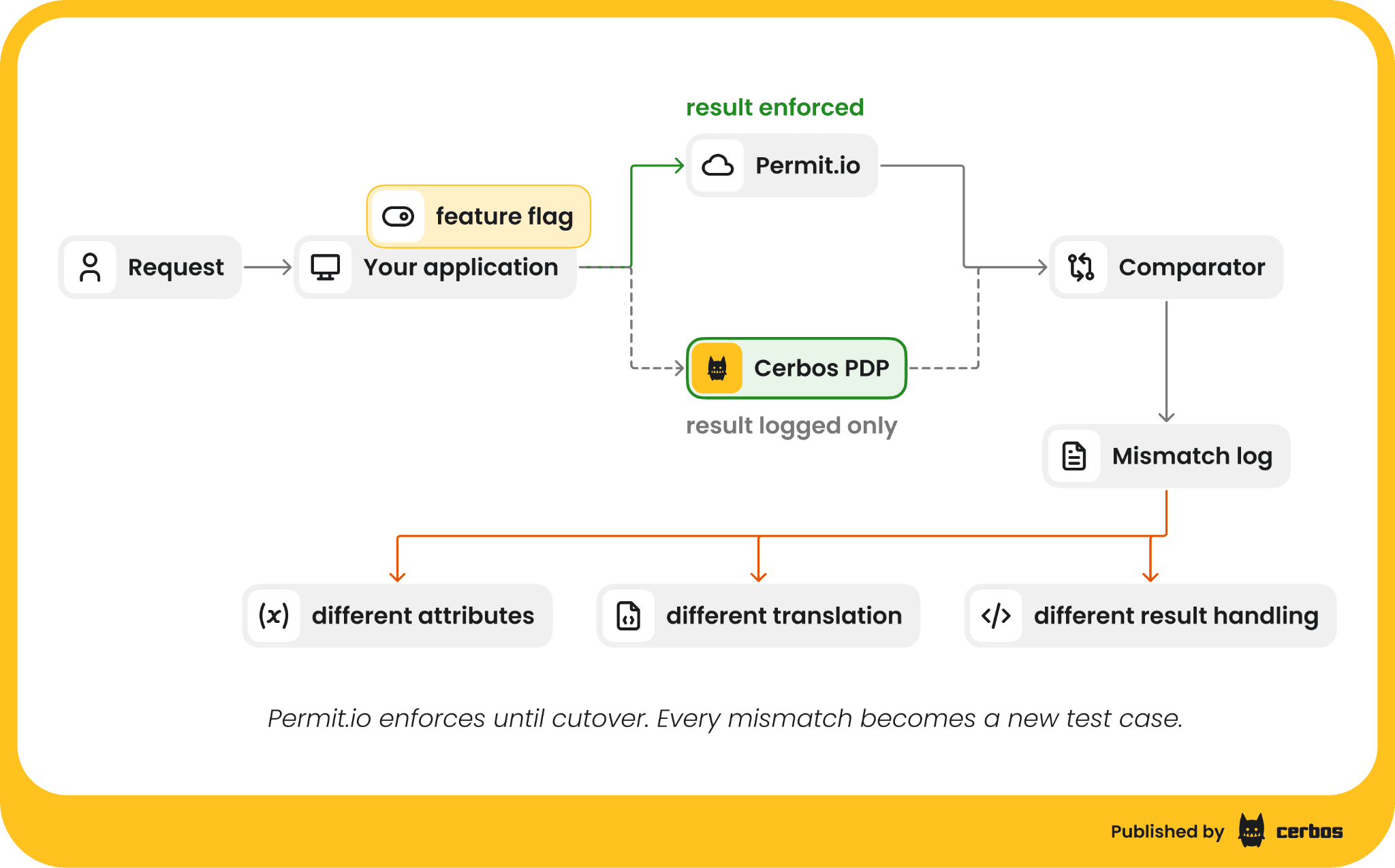
Before Cerbos enforces anything, run it next to Permit on real traffic.
-
Send every check to both. At each enforcement point you are migrating, call Cerbos alongside Permit, but keep enforcing Permit's answer.
-
Log both decisions. Cerbos Hub collects every Cerbos decision with its inputs, linked to the policy version that made it, so a mismatch can be traced to a rule or a missing attribute.
-
Fix every mismatch. Most mismatches are data that Permit had synced and Cerbos did not receive. The rest are rules that were broader or narrower than anyone remembered. Each fix becomes a test.
-
Agree the exit bar with your security team before you start, for example zero unexplained mismatches over two weeks of production traffic for the service.
Switching over to Cerbos and decommissioning Permit.io
Move enforcement one service at a time, once that service meets the exit bar. Keep Permit running for the services not yet moved, then for a short rollback window after the last one. Export Permit's audit logs through its API for the retention period your regulators require, then retire the Edge PDPs, the sync code and the Permit environment.
At cutover, check three things with your audit team.
-
Cerbos Hub is collecting decision logs from every decision point.
-
Policy changes are going through review.
-
You can answer "show me the policy that was in effect at the time" for any decision since cutover.
Common challenges when migrating from Permit.io, and how to solve them
Rules that only exist in the policy editor. Some rules were built in Permit's editor and nobody has looked at the generated code. Rebuild them from their business intent, not from the generated Rego. Write the rule in plain words, agree it with its owner, then write the policy and the test.
Data that Permit held and nobody else did. Occasionally a role assignment or relationship was only ever written to Permit, through Elements or the API. Export it before cutover and move it into your own database, so it has an owner again.
Deep relationship chains. Role derivations that span several levels, such as organization to project to folder to document, need the relationship data for each level. Where the levels form a path, send it as one attribute, such as acme.finance.q3, and check it with hierarchy functions in the condition. Otherwise send the resolved list with the request, or have a Cerbos Synapse data source resolve it from your database at decision time.
Product and support staff who changed roles in Permit's editor. Add them as reviewers on the pull requests for their rules, so they approve each change, and give them the Cerbos Hub playground and permissions matrix to see the effect before a change is proposed. For tenant roles your customers manage, the change happens in your own admin screens.
Planning your migration from Permit.io
Start with the service that has the fewest data sources and no Elements, not the most important one. Settle the request shape and the data list there, then reuse them for the harder services. Start early enough that you go into your next Permit renewal with at least one service running on Cerbos against your own traffic, and a mismatch log that shows how close the rest is.
Book a call and bring a few of your Permit policies and the data they use. We will model them in Cerbos with you, write tests that check they give the same decisions as today, and help you build a migration plan, timeline and risk view your security and audit teams can review.
To start on your own, try Cerbos to build and test your translated policies.
Go deeper:
FAQ
Tagged in