This guide is for teams that run PingAuthorize or PingOne Authorize today and are moving authorization to Cerbos, or want to know what the move involves before a renewal or a major version upgrade. It is written for the architect or engineer doing the work, and for the identity and security leads who need to sign off on the plan.
Ping keeps doing identity. PingFederate, PingOne or PingAM still sign people in and issue tokens, and your directories stay where they are. Your enforcement points stay in place too, and the access rules your business agreed stay the same. What changes is where the rules are written and reviewed, where attribute data comes from at decision time, and which component each application or gateway asks for a decision.
For the identity lead, sign-in, groups and roles stay in Ping, and Cerbos policies read them from the Ping token or from PingDirectory and PingOne when the decision is made. For the security team, with audit logging on, every Cerbos decision is logged with the policy version behind it from the first shadow request, so the evidence for the cutover builds up before anything is enforced. For the CTO, the cost sits in rewriting rules and mapping attributes, and the move runs one service at a time, timed to finish before the next PingAuthorize renewal.
Why migrating from PingAuthorize is mostly an authoring and attribute question
Calling a different decision service is the smallest part of the work. The real work is in two places.
The first is authoring. Your rules live in the Policy Editor today, as a Trust Framework of domains, services, actions and attributes and a tree of policy sets, policies and rules. There is no converter from a PingAuthorize snapshot to Cerbos, and the snapshot carries the editor's own structure. Writing each rule from its intent, with a test that proves it, produces policy your engineers, security reviewers and auditors can read and review in Git, and the tests become the definition of a correct migration.
The second is attributes. PingAuthorize resolvers fetch values in order from HTTP, LDAP, database and SCIM services, so a decision can depend on data nobody sees in the request. In Cerbos, the application sends what it already knows, including claims from the Ping token, and Cerbos Synapse fetches the rest at decision time from the system that owns it. Listing every attribute your resolvers fetch today, and deciding who supplies each one, is what makes the decisions match.
What replaces PingAuthorize after you migrate
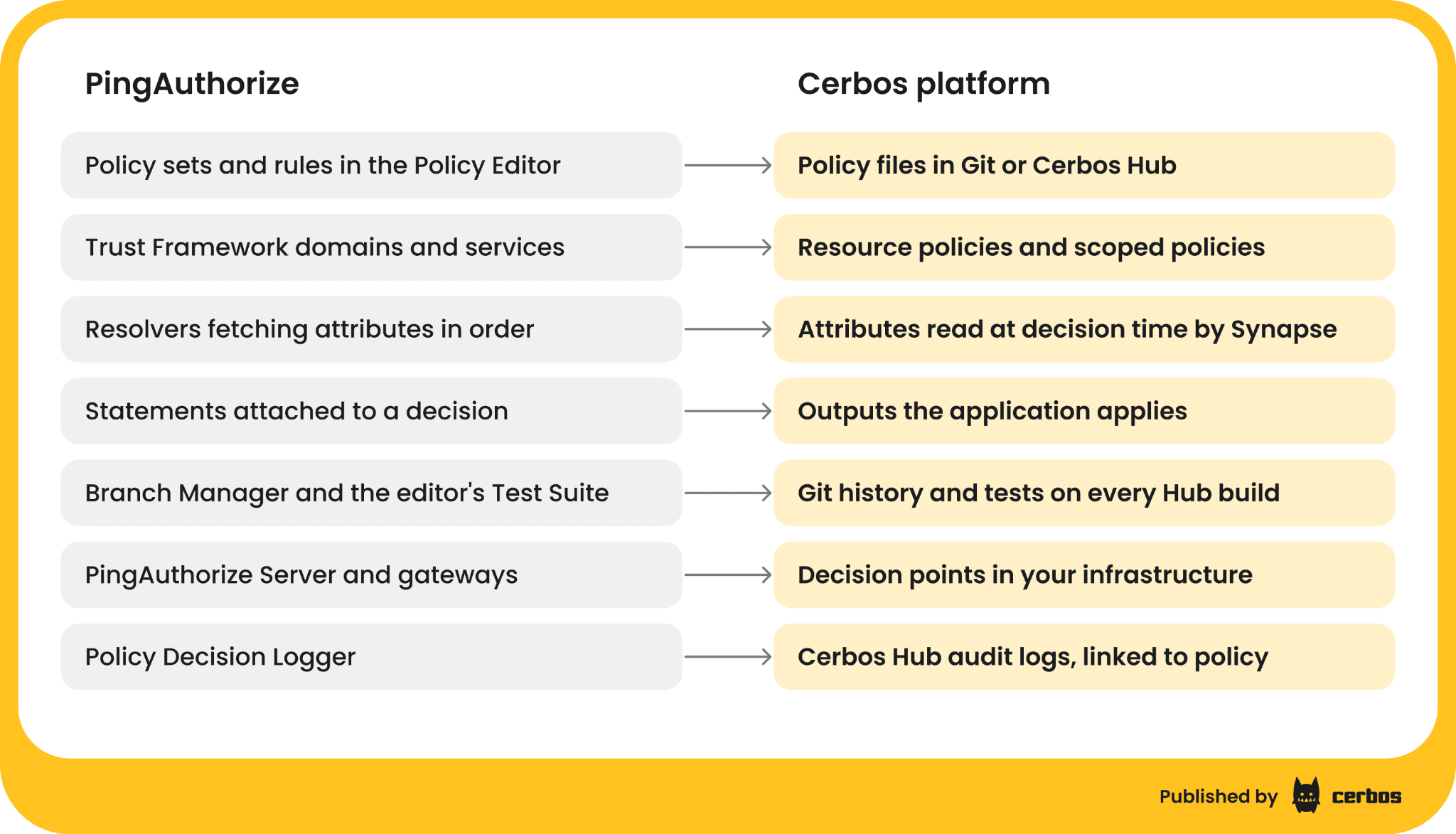
Each part of PingAuthorize and PingOne Authorize has a counterpart in the Cerbos platform.
-
The Policy Editor and PingOne Authorize console become policy files in Git or Cerbos Hub policy stores. Changes go through code review and tests, and Cerbos Hub builds, versions and distributes them to every decision point. Cerbos Hub runs hosted, or on-premise and air-gapped for enterprise customers.
-
PingAuthorize Server and Authorize gateways become Cerbos decision points running in your infrastructure, as a service, sidecar, DaemonSet or serverless function. They hold policy only, use a client credential for their deployment to download policy from Cerbos Hub, and keep working on the last policy they received if Cerbos Hub is unreachable.
-
Resolvers and Trust Framework services become request attributes, Ping token claims and Cerbos Synapse data sources, which fetch identity, resource and relationship data from directories, including PingDirectory over LDAP and PingOne through its API, and from databases and APIs at decision time, with caching you configure.
-
The API security gateway and sideband become Cerbos at your existing gateway, Kong or Apigee, or Cerbos Synapse for Envoy and Istio, plus SDK calls in your applications.
-
The Test Suite becomes Cerbos test suites, YAML files next to the policies that run in any CI system and that Cerbos Hub runs before it builds each deployment.
-
Statements become rule outputs, which the system that called Cerbos applies, your application or the service behind your gateway.
-
The Policy Decision Logger becomes decision logs from every decision point, collected by Cerbos Hub and linked to the policy version that made each decision.
Key Cerbos principles to know before translating
Policies are organized by resource. A resource policy holds every rule for one kind of resource, such as account, with the actions it supports. Shared logic lives in derived roles, variables and scoped policies.
Everything is denied unless a rule allows it, and every action comes back as allow or deny. There is no NotApplicable or Indeterminate in the answer.
A deny wins over an allow for the same role. If a person has several roles and one of them is allowed with no deny for that role, the action is allowed. To make a deny apply to everyone, write it for every role, roles: ["*"].
Rules have no order. Cerbos has one evaluation model, so conditions do the work that rule order and combining algorithms do in PingAuthorize.
Attributes are typed values. The principal (P) and the resource (R) carry attributes as strings, numbers, lists and maps, rather than PingAuthorize's string map, and CEL conditions read them directly.
Rules can return outputs, a value computed in CEL and returned with the decision, which is where statements go.
PingAuthorize to Cerbos concept mapping
| PingAuthorize or PingOne Authorize | Cerbos | Notes |
|---|---|---|
| Domain | A resource kind, or a scoped policy for a business unit | Scopes replace domains that exist to separate business units |
| Service | A resource kind | Banking.Accounts becomes the account resource policy |
Action (Retrieve, inbound-GET) |
The requested action, matched by the rule's actions |
Name actions after the business operation, such as view |
| Identity provider in the Trust Framework | The token issuer, verified by the application, or by Cerbos when the token is passed with the request (auxData) |
Ping stays the identity provider |
| Attribute with a Request resolver | P.attr or R.attr on the request |
|
| Attribute with a Service resolver | A Cerbos Synapse data source, or the application loads it | Caching set per source |
| Ordered resolvers with fallbacks | One source per attribute, decided up front | Write the fallback into the data source or the application |
| Named condition | A CEL condition, or a variable shared across rules | |
| Policy set and policy | A resource policy, with derived roles for shared role logic | No tree to nest |
| Rule effect Permit or Deny | EFFECT_ALLOW or EFFECT_DENY |
"Permit if condition holds, otherwise deny" is an allow with a condition |
| Combining algorithms | Cerbos' one evaluation model | See the next section |
| Statements (Filter Response, Exclude Attributes, Regex Replace Attributes) | Rule outputs | The application applies them |
| Query requests ("which actions can Joe take") | PlanResources query plans, or a check with several actions |
|
| Branch Manager, snapshots, deployment packages | Git, Cerbos Hub policy stores, builds and deployments | Every deployment is a tested, versioned build |
| Test Suite in the Policy Editor | Cerbos test suites in YAML | Run by cerbos compile, in CI and by Cerbos Hub |
JSON decision API (/governance-engine) |
CheckResources, or the AuthZEN evaluation API |
Several resources and actions in one call |
| Sideband API behind Kong or Apigee | Cerbos at Kong or Apigee | Same gateway, different decision service |
| PingOne Authorize decision endpoints | Cerbos decision points per environment, with Cerbos Hub deployments | Dev, test and production as separate deployments |
| Policy Decision Logger and Decision Visualizer | Decision logs collected by Cerbos Hub, and execution traces in the playground | Linked to the policy version |
PingAuthorize combining algorithms in Cerbos
PingAuthorize lets each policy set choose how its children combine, with first applicable as the default. Cerbos has one evaluation model and no combining algorithms to choose from, so each one maps to a way of writing the policy that gives the same result under that model.
| PingAuthorize algorithm | How to get the same result in Cerbos |
|---|---|
| Unless one decision is permit, the decision will be deny | The default. No allow means deny |
| A single deny will override any permit decisions | The default for one role. Write cross-role denies with roles: ["*"] |
| A single permit will override any deny decisions | Write the exceptions into the allow rule's condition instead of a separate deny, or split the roles |
| Unless one decision is deny, the decision will be permit | Write an allow for every role, roles: ["*"], and the exceptions as deny rules |
| First applicable (the default) | Rules have no order. Make the conditions mutually exclusive, or move each layer into a scoped policy, where the most specific scope that decides wins. This is the closest pattern, not an exact equivalent |
| Only one applicable | Merge the overlapping policies, so only one rule can apply |
| Weighted average threshold | Compute the score in the application or a Cerbos Synapse data source, pass it as an attribute, and compare it in a condition |
A worked example of translating a PingAuthorize policy to Cerbos
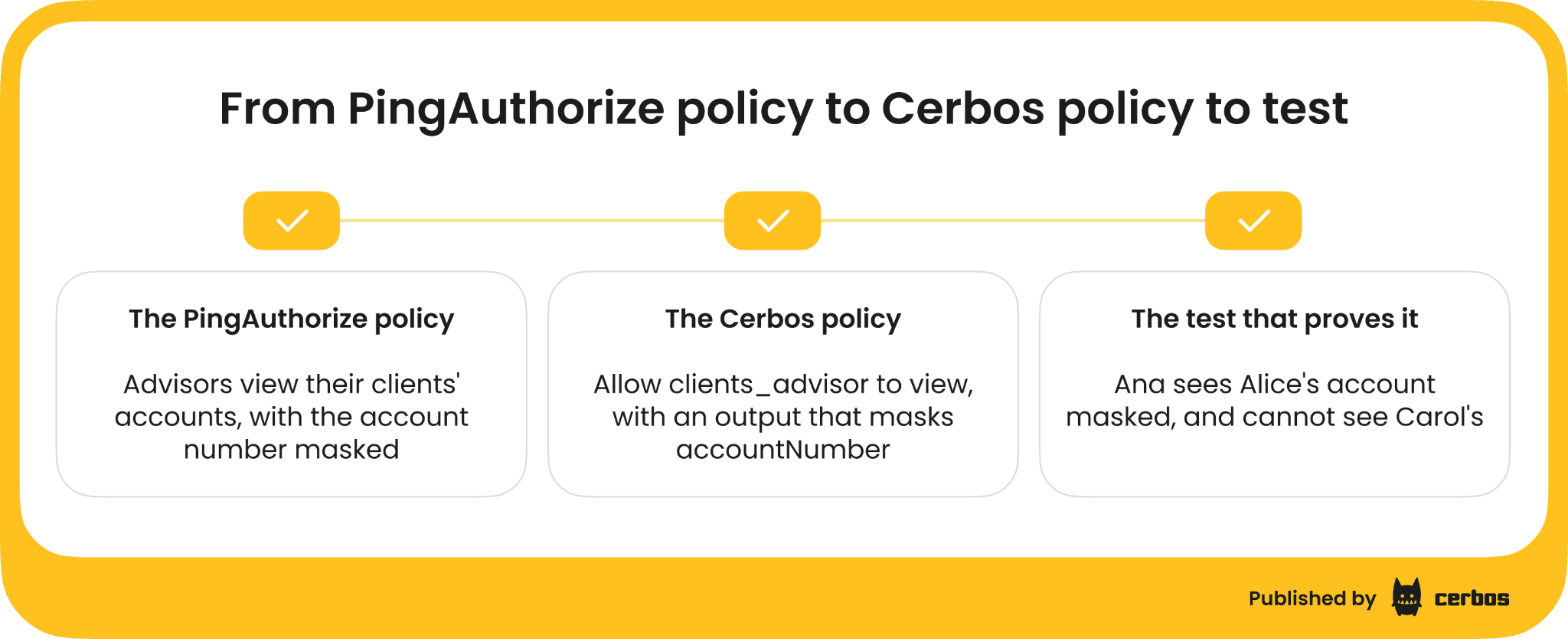
Here is a policy typical of a bank on PingAuthorize, protecting an accounts API. Customers can view their own accounts. Advisors can view the accounts of their own clients. Everyone except fraud analysts sees the account number masked.
In PingAuthorize, that is built in the Policy Editor. A Trust Framework service Banking.Accounts defines attributes for the user's id and role, the account owner, and the advisor's client list, fetched by a Service resolver from the system that holds advisor assignments. A policy set targeted at Banking.Accounts uses "Unless one decision is permit, the decision will be deny", with a rule that permits when the account owner is the user, and a rule that permits when the user is an advisor and the client list contains the account owner. A separate policy on outbound responses attaches a Regex Replace Attributes statement to the account number unless the user's role is fraud analyst.
The decisions you know must hold today are the definition of a correct migration, so write them as a Cerbos test suite first, then make the policies pass.
# tests/account_test.yaml
name: AccountTestSuite
principals:
 alice:
   id: alice
   roles: ["customer"]
 bob:
   id: bob
   roles: ["customer"]
 ana:
   id: ana
   roles: ["advisor"]
   attr:
     clientIds: ["alice"]
 frank:
   id: frank
   roles: ["fraud_analyst"]
resources:
 alice_account:
   kind: account
   id: acct-1
   attr:
     ownerId: alice
 carol_account:
   kind: account
   id: acct-2
   attr:
     ownerId: carol
tests:
 - name: Customers see their own account, masked, and nobody else's
   input:
     principals: ["alice", "bob"]
     resources: ["alice_account"]
     actions: ["view"]
   expected:
     - principal: alice
       resource: alice_account
       actions:
         view: EFFECT_ALLOW
       outputs:
         - action: view
           expected:
             - src: resource.account.vdefault#owner-or-advisor-views-masked
               val:
                 mask: ["accountNumber"]
     - principal: bob
       resource: alice_account
       actions:
         view: EFFECT_DENY
 - name: Advisors see their clients' accounts, masked, and no others
   input:
     principals: ["ana"]
     resources: ["alice_account", "carol_account"]
     actions: ["view"]
   expected:
     - principal: ana
       resource: alice_account
       actions:
         view: EFFECT_ALLOW
       outputs:
         - action: view
           expected:
             - src: resource.account.vdefault#owner-or-advisor-views-masked
               val:
                 mask: ["accountNumber"]
     - principal: ana
       resource: carol_account
       actions:
         view: EFFECT_DENY
 - name: Fraud analysts see any account
   input:
     principals: ["frank"]
     resources: ["alice_account", "carol_account"]
     actions: ["view"]
   expected:
     - principal: frank
       resource: alice_account
       actions:
         view: EFFECT_ALLOW
     - principal: frank
       resource: carol_account
       actions:
         view: EFFECT_ALLOW
The relationships become derived roles, so the resource policy can refer to them by name.
# derived_roles/account_roles.yaml
apiVersion: api.cerbos.dev/v1
derivedRoles:
 name: account_roles
 definitions:
   # A customer who owns the account
   - name: account_owner
     parentRoles: ["customer"]
     condition:
       match:
         expr: R.attr.ownerId == P.id


   # An advisor whose client owns the account
   - name: clients_advisor
     parentRoles: ["advisor"]
     condition:
       match:
         expr: R.attr.ownerId in P.attr.clientIds
The resource policy holds the rules, and the masking statement becomes an output on the rule that grants masked access.
# resources/account.yaml
apiVersion: api.cerbos.dev/v1
resourcePolicy:
 version: default
 resource: account
 importDerivedRoles:
   - account_roles
 rules:
   # Owners and their advisors see the account, with the number masked
   - name: owner-or-advisor-views-masked
     actions: ["view"]
     effect: EFFECT_ALLOW
     derivedRoles: ["account_owner", "clients_advisor"]
     output:
       when:
         ruleActivated: |-
           {"mask": ["accountNumber"]}


   # Fraud analysts see every account in full
   - name: fraud-analyst-views-in-full
     actions: ["view"]
     effect: EFFECT_ALLOW
     roles: ["fraud_analyst"]
A few things changed on the way across. The service target became the policy's resource. The two permit rules became one allow rule over two derived roles, and "Unless one decision is permit, the decision will be deny" is simply how Cerbos works. The advisor's client list, which a Service resolver fetched in PingAuthorize, arrives as P.attr.clientIds, sent by the application or fetched by a Cerbos Synapse data source. The Regex Replace Attributes statement became an output naming the field to mask, which the application applies. Run cerbos compile locally or in CI, or let Cerbos Hub run the suite before it builds the deployment, and the policies only ship when all six tests pass.
If your team works with an AI coding agent, the Cerbos agent skills help with the rewrite. Install them with npx skills add cerbos/skills, give the agent your rules written in plain words, and it writes each one as a Cerbos policy with a test suite and runs the tests until they pass. Your reviewers still approve every policy before it ships.
Getting your rules out of PingAuthorize
Start with an inventory, not a conversion. Generate a snapshot of your Trust Framework and policies from the Policy Editor, and list every domain, service, action, attribute and resolver, with the policy sets that use them. For PingOne Authorize, export the same from the console for each environment.
Use the snapshot as a reference for what the rules are. Write the rules in plain words first, one service at a time, agree them with the person who owns that service, then write the Cerbos policy and its tests. Trust Frameworks that grew over years often hold attributes and conditions nothing uses any more, and the inventory is the moment to retire them rather than carry them across.
Where PingAuthorize attributes go after the migration
List every attribute your policies read, and for each one write down which resolver supplies it today.
-
Request resolver attributes. Keep sending them, as principal or resource attributes on the Cerbos request.
-
Claims from the Ping token. The application passes the claims from the PingFederate or PingOne token, such as groups, populations and custom attributes, as principal attributes. See Cerbos with Ping Identity.
-
Service resolver attributes from a directory. A Cerbos Synapse data source reads the directory at decision time, as we show in looking up identity attributes at decision time, so a change applies without a new token, as soon as the cache for that source allows.
-
Service resolver attributes from a database or API. Send them from the record the application already loaded, or let a Cerbos Synapse data source read them from the database that owns them.
-
Constant and system attributes. Constants become policy variables, and time comes from
now()in the condition.
For each item, also write down how stale it is allowed to be. That list is the Synapse cache configuration, and it is what your audit team will want to see.
PingAuthorize statements as Cerbos outputs
Every statement becomes an output on the rule that produced it, returned with the decision.
What changes depends on how you call PingAuthorize today. If an application calls the JSON decision API, it already implements the statements, because Ping's documentation says the application must. It reads the output from Cerbos instead. If PingAuthorize Server sits in the API path and applies statements itself, the application takes over that step, filtering or masking the response according to the output. For lists, replace Filter Response with query plans, so the search only returns the records a person may see in the first place.
Replacing PingAuthorize decision calls with Cerbos
A JSON decision request to PingAuthorize looks like this, with every attribute as a string keyed by its Trust Framework name.
{
 "domain": "Banking",
 "service": "Banking.Accounts",
 "action": "Retrieve",
 "attributes": {
   "User.id": "ana",
   "User.role": "advisor",
   "Account.id": "acct-1"
 }
}
The same check through the Cerbos JavaScript SDK reads like this.
const decision = await cerbos.checkResource({
 principal: {
   id: "ana",
   roles: ["advisor"],
   attr: { clientIds: ["alice"] },
 },
 resource: {
   kind: "account",
   id: "acct-1",
   attr: { ownerId: "alice" },
 },
 actions: ["view"],
});


if (decision.isAllowed("view")) {
 const masking = decision.output(
   "resource.account.vdefault#owner-or-advisor-views-masked",
 );
 // mask the fields listed in masking.mask before returning the account
}
Cerbos SDKs exist for eight languages, plus Laravel, and one CheckResources call can ask about several resources and actions at once, which replaces batch requests. If you would rather keep a standard request format, Cerbos PDP and Cerbos Synapse both implement the AuthZEN Authorization API. Put the call behind one function in each service, so the swap is one change per service.
If PingAuthorize Server sits behind Kong or Apigee as a sideband today, keep the gateway and have it call Cerbos in the same place, through a custom integration. The gateway calls Cerbos through its API or AuthZEN, or sends its existing callout to a Cerbos Synapse route, then enforces the decision, and the service behind it applies any output, such as fields to mask. See Cerbos with Kong and Cerbos with Apigee.
Porting tests from the PingAuthorize Test Suite
Each scenario and assertion in the Policy Editor's Test Suite becomes an entry in a Cerbos test suite, a principal, a resource, an action and the expected effect, plus any expected outputs. Because the suites are files, they run in CI on every pull request and in Cerbos Hub before every build.
If you have few tests, build them from production. Take a sample of real requests and their PingAuthorize decisions from the decision logger, and turn them into fixtures. That gives you the decisions that actually happen, not the ones someone remembered to test.
Running Cerbos beside PingAuthorize in shadow mode
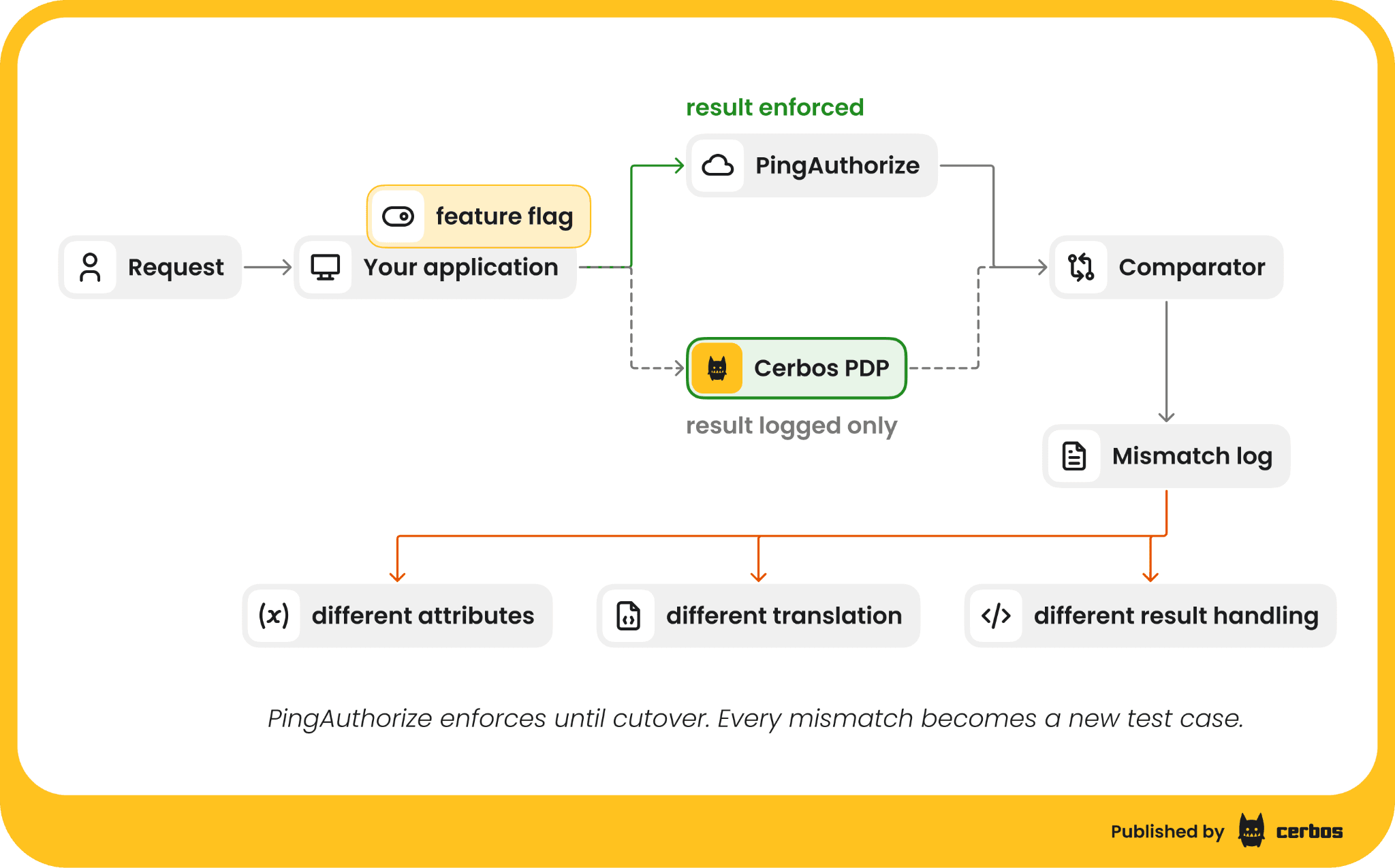
Before Cerbos enforces anything, run it beside PingAuthorize on real traffic.
-
Send every check to both. At each enforcement point you are migrating, call Cerbos alongside PingAuthorize, but keep enforcing PingAuthorize's answer.
-
Log both decisions. With audit logging on, Cerbos Hub collects every Cerbos decision with its inputs, linked to the policy version that made it, so a mismatch can be traced to a rule or a missing attribute.
-
Fix any mismatch. Most mismatches are attributes a resolver fetched that the Cerbos request did not carry. The rest are rules that depended on first applicable ordering or on a statement nobody listed. Each fix becomes a test.
-
Agree the exit bar with your security team before you start, for example zero unexplained mismatches over two weeks of production traffic for the service.
Switching over and decommissioning PingAuthorize
Move enforcement one service at a time, once that service meets the exit bar. Keep PingAuthorize running for the services not yet moved, then for a short rollback window after the last one. Plan the last cutover ahead of your next PingAuthorize license renewal or major version upgrade, so you are not renewing for a product you are about to retire. Export the decision logs your regulators require before you shut it down. Ping keeps running identity throughout.
Common challenges when migrating from PingAuthorize, and how to solve them
Rules that depend on order. First applicable is PingAuthorize's default, so some rules only work because of where they sit in the tree. Write the condition that made them win into the rule itself, then test both orders' cases.
Resolvers with fallbacks. A Service resolver that times out falls through to the next one. Decide one source per attribute, and put any fallback into the Synapse data source or the application.
Statements the gateway applied automatically. When PingAuthorize Server sat in the API path, masking and filtering happened without the application knowing. List every statement on every outbound policy, and make sure the application applies each output before cutover.
Everything is a string. PingAuthorize decision requests carry attributes as strings. Cerbos attributes are typed, so send numbers as numbers and lists as lists, and attach a schema to catch mismatches.
Weighted average threshold policies. Compute the score where the inputs live, pass it to Cerbos as an attribute and compare it in a condition.
Policy owners who used the visual editor. Add them as reviewers on the pull requests that change their rules, and give them access to the Cerbos Hub playground and permissions matrix to check the effect first.
Planning your migration from PingAuthorize
Start with the service that has the fewest resolvers and no outbound statements, not the most important one. Settle the request shape and the attribute list there, then reuse them for the harder services. Start early enough that you go into your next PingAuthorize renewal with at least one service running on Cerbos against your own traffic, and a mismatch log that shows how close the rest is.
Try Cerbos with the first service you plan to move. Your engineers swap the PingAuthorize call for one Cerbos call and keep their enforcement points, your identity team keeps every group and role in Ping, and your security team gets a log of every decision during shadow mode to show the new rules match the old ones.
To plan the move from PingAuthorize, book a call with our team, bring a few policies and the attributes they use, and leave with a migration plan your security and audit teams can review.
Go deeper:
FAQ
Tagged in