If your application checks permissions through Oso Cloud, you are probably deciding what to do about the news. In October 2026 Tiny acquired the Oso Cloud product and its customer contracts, and most of the Oso team, including its founder, joined Temporal to work on authorization for AI agents. Oso Cloud keeps running with a "small but dedicated team" staying on, but no roadmap has been published, so your next renewal is the natural point to decide who builds your authorization layer from here.
Moving from Oso to Cerbos is less a policy rewrite than a data question. Most Polar rules translate directly into Cerbos policies, and the exceptions (scoped roles, recursion and exclusions) have known patterns. The real work is deciding, for each fact Oso holds, where it comes from at decision time, and the SQL you already wrote for Oso Sync or Local Authorization is the starting point for that. The migration then runs one resource type at a time. Inventory your resource blocks and facts, translate one resource type and port its tests, run Cerbos beside Oso until the decisions match, move its list filtering, cut it over, and repeat.
Below you will find how each Polar concept maps to Cerbos, a worked translation that passes its tests, where your facts go, how to replace authorize, list and list_local, and how to prove parity before cutover.
Migrating from Oso Cloud or the deprecated oso library
Two groups of teams are asking about this. The first runs Oso Cloud, the managed service where Polar policies are evaluated against facts you send to Oso. Most of this guide is written for you.
The second still uses the open source oso library, which evaluated Polar inside your application process against your own objects. That library has been deprecated since December 2023, so for you the trigger is the deprecation rather than the acquisition. The policy translation and testing steps below apply to you unchanged. The data step is slightly different, because Polar resolved relationships by calling into your application objects on demand, and those relationships now have to be passed to the policy decision point as attributes or fetched for it.
Why migrating from Oso to Cerbos is mostly a data question
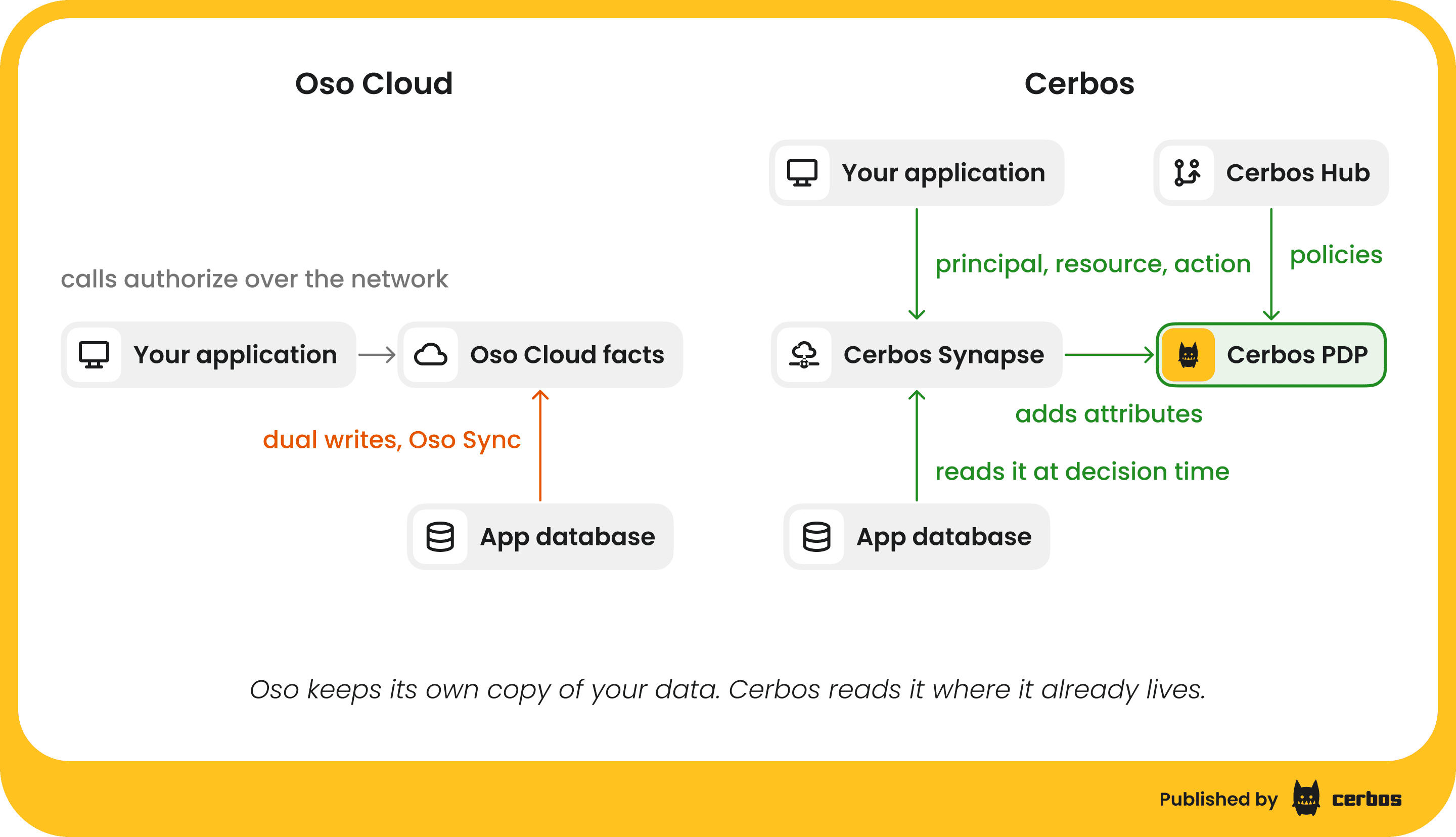
Polar is a logic language that combines role based access control, relationship based access control and attribute checks in one place. You declare actors and resources, give resources roles, permissions and relations, and write rules such as "a repository reader is anyone who is a member of the repository's organization". Oso Cloud evaluates those rules against facts, such as has_role(User{"alice"}, "admin", Organization{"acme"}) or has_relation(Repository{"anvil"}, "organization", Organization{"acme"}). You either write those facts into Oso Cloud and keep them current with dual writes and Oso Sync, or you describe them as SQL queries against your own database with Local Authorization.
Cerbos works the other way around. Cerbos PDP is a stateless policy decision point that keeps no copy of your data. Your application sends the principal (who is asking), the resource (what they want to touch) and the action, along with the attributes the policy needs. Cerbos evaluates YAML policies with conditions written in Google's Common Expression Language and returns allow or deny. When the attributes are not something your application already has to hand, Cerbos Synapse fetches them from your databases and services at decision time. Cerbos Hub builds, tests and distributes policies to every PDP, and collects the decision logs.
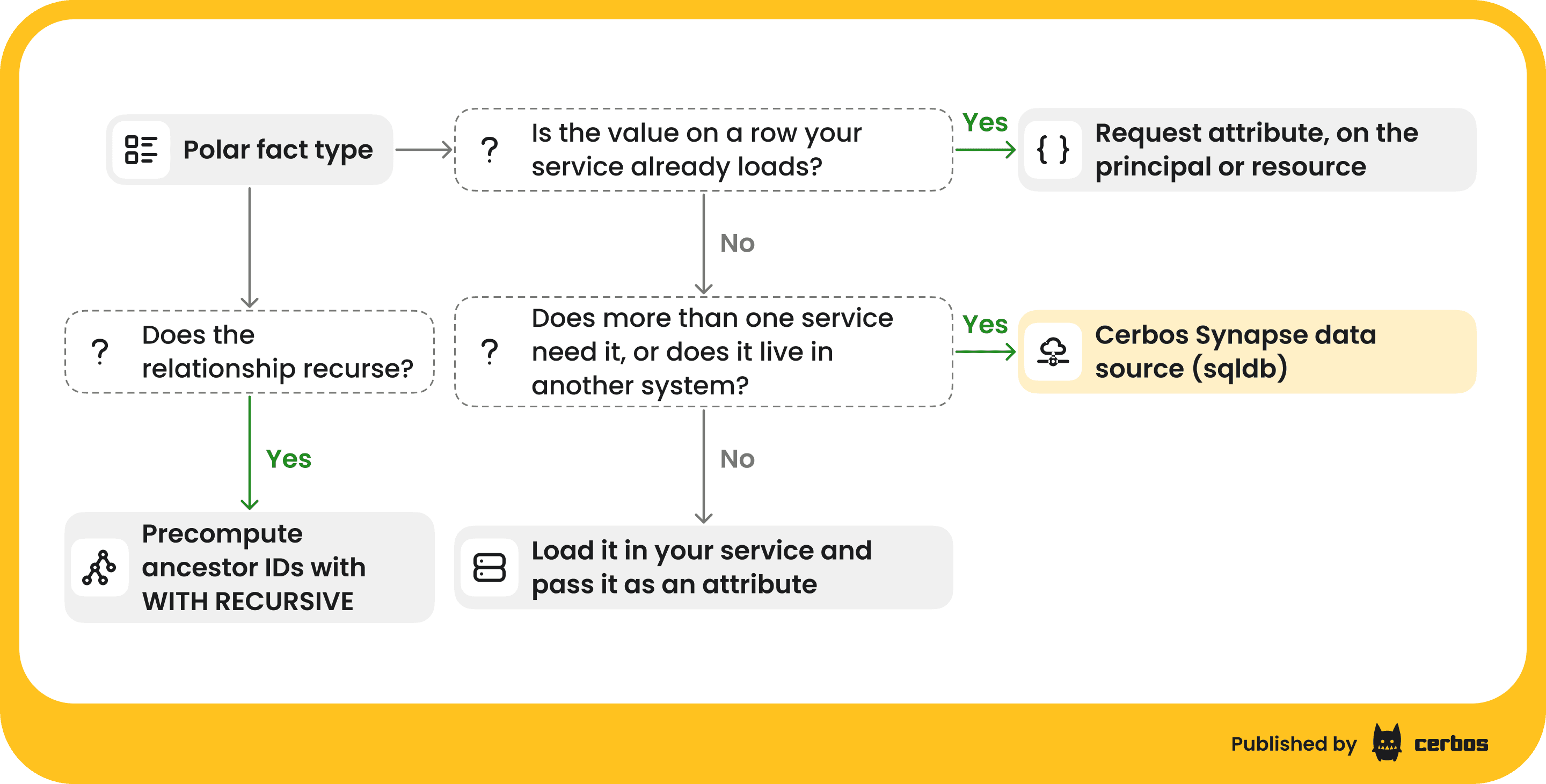
That difference is why the migration centers on data. For each fact your Polar rules read, you decide where it comes from at decision time. If you use Oso Sync or Local Authorization, the answer is usually the database the fact already lives in, and the SQL you wrote for them already says exactly where that is, so you build on it rather than throw it away.
What replaces Oso Cloud’s managed service after you migrate
Oso Cloud is a managed service, so it is fair to ask how much of it you would end up running yourself. With the Cerbos authorization management platform, the part that has to sit next to your application, Cerbos PDP, runs in your infrastructure, and Cerbos Hub manages the rest as a service.
Your policies live in Git. Hub builds them on every change, runs your test suites, and pushes the compiled bundle to every PDP without a restart. A build that fails its tests never reaches your PDPs, which keep serving the last good bundle. Where you used Oso's rules editor and explain view to see why a decision came out the way it did, the Hub playground shows each rule, condition and variable evaluated for a request. Decision logs from every PDP flow into Hub, where each entry names the policy that produced it, and you can also send them to your own pipeline. If you need everything inside your own network, Cerbos Hub on-premise runs the same control plane there, including air-gapped environments.
What you no longer operate at all is a second copy of your authorization data. There is no fact store to write to, no sync job to reconcile, and no fallback node to keep warm, because every PDP decides from the request and its own copy of the policies.
Key Cerbos principles to know before translating Polar
A few habits from Polar need adjusting before the translation reads naturally.
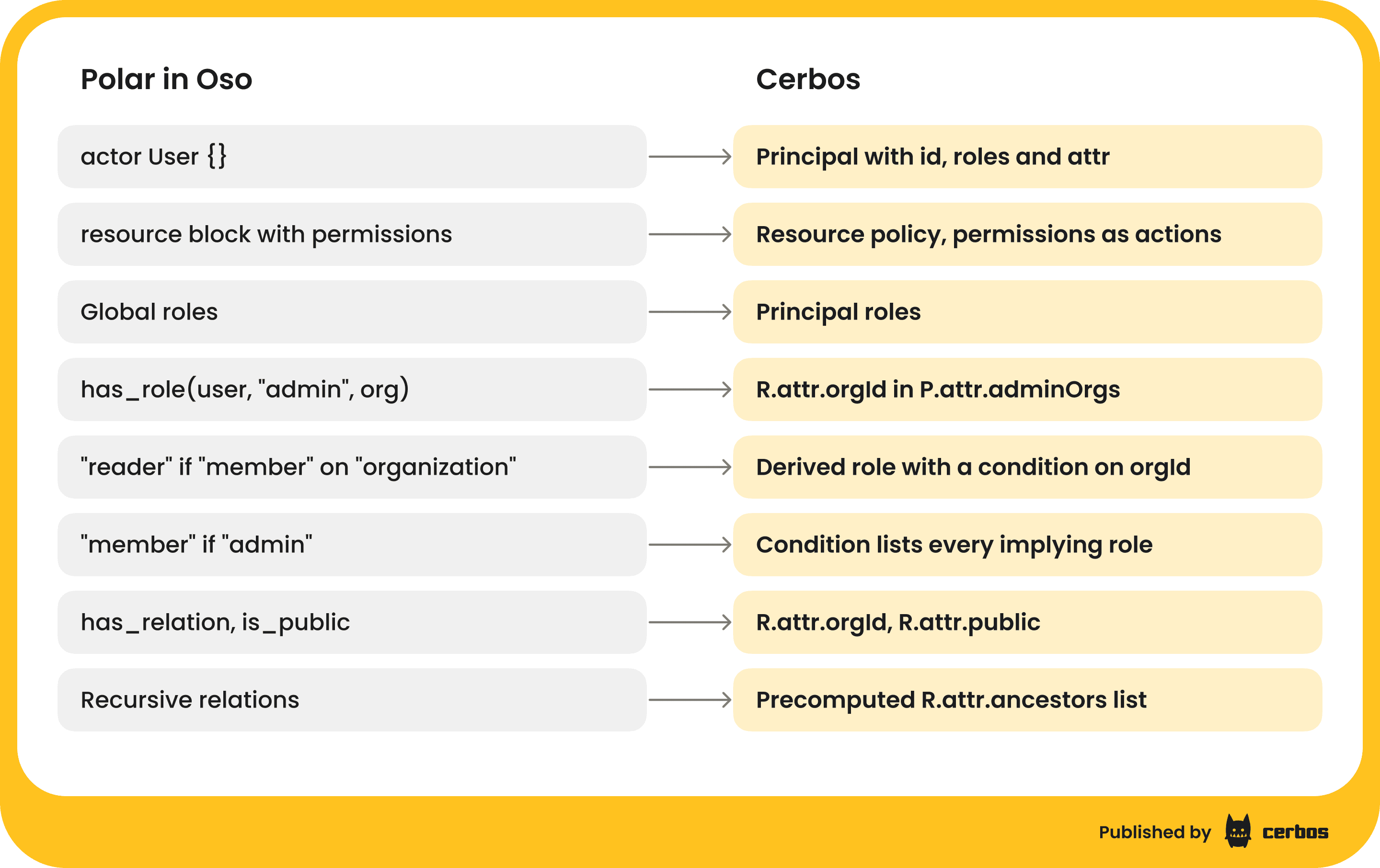
Policies are organized by resource kind. Each Polar resource block becomes a resource policy for that kind, and Polar permissions become actions. Actor blocks have no direct equivalent, because the principal is whatever your application sends on the request.
Roles are global, and scoped roles become derived roles. In Polar, Alice can be an admin of the acme organization and nothing else. In Cerbos, the roles on a principal apply everywhere, so a role that only holds on some resources becomes a derived role, granted when a condition comparing principal and resource attributes is true. This is the biggest modeling change in most Oso migrations.
Deny is a first class effect. Polar has no deny rule, so exclusions are written as not inside a rule body. Cerbos has EFFECT_DENY, and for a single role a matching deny beats a matching allow. Across roles, an allow from any one role wins, so a deny meant to apply to everyone has to be written for every role, as the worked example below shows. The evaluation rules spell this out.
Everything is deny by default. If no rule allows an action, the answer is deny. A condition that reads an attribute the request did not send does not match, so an allow rule grants nothing and a deny rule does not fire. That is why the request shape matters as much as the policy.
Conditions do not recurse. CEL has no recursion, so relationships Polar followed through a graph (a folder inside a folder inside a folder) are resolved before the check and passed in as a list. We cover how further down.
Oso to Cerbos concept mapping
Map where each fact will come from before you translate any Polar. The rules are the shorter job, because the policies are short (each one in the worked example below is under 40 lines of YAML), while the data mapping touches your schema and every call site.
| Oso | Cerbos | What changes |
|---|---|---|
actor User {} |
Principal with id, roles and attr |
The principal is built from your user record on each request |
resource block with permissions |
Resource policy for that kind, permissions become actions |
One resource policy per resource block |
| Global roles | Principal roles |
Assigned in your application or identity provider as today |
Roles on a resource, has_role(user, "admin", org) |
Derived role over a principal attribute, such as R.attr.orgId in P.attr.adminOrgs |
Use one list per role rather than a map, so query plans stay clean |
"reader" if "member" on "organization" |
Derived role with a condition on the related resource's ID | One hop is a single condition |
"member" if "admin" (role implication) |
Spell it out in the derived role condition | The condition lists every role that implies this one |
has_relation and is_public facts |
Resource attributes such as R.attr.orgId and R.attr.public |
Read from the row you already loaded |
| Recursive relations | A precomputed list such as R.attr.ancestors |
Resolved with a recursive query before the check |
| Context facts | Principal or resource attr on the request |
Passed with the request |
not inside a rule body |
EFFECT_DENY rule with a condition |
Write it for roles: ["*"] when it must apply to everyone |
@current_unix_time |
now() compared with timestamp(...) |
Tests set a fixed time with options.now |
| Oso Sync, dual writes, Local Authorization SQL | Attributes from your application, or a Cerbos Synapse data source | No second copy of the data to keep in sync |
authorize and actions |
CheckResources (one or many resources, many actions) |
Batch checks are built in |
list, list_local |
PlanResources plus a query plan adapter |
The plan becomes a WHERE clause in your ORM |
Polar test blocks |
YAML test suites run by cerbos compile and Cerbos Hub |
Setup facts become principal and resource fixtures |
| Rules editor and explain | Cerbos Hub playground traces and audit logs | Traces show each rule and condition evaluated |
| Edge and fallback nodes | Cerbos PDP in your infrastructure | Sidecar, service or DaemonSet next to your application |
A worked example of translating Polar to Cerbos
The example below is the organization and repository model most Oso users will recognize. Organization members can read the organization's repositories, organization admins are also members and can push, and anyone can read a public repository.
actor User {}

resource Organization {
  roles = ["member", "admin"];
  permissions = ["read", "add_member"];

  "member" if "admin";
  "read" if "member";
  "add_member" if "admin";
}

resource Repository {
  roles = ["reader", "maintainer"];
  permissions = ["read", "push"];
  relations = { organization: Organization };

  "reader" if "member" on "organization";
  "maintainer" if "admin" on "organization";
  "reader" if "maintainer";

  "read" if "reader";
  "push" if "maintainer";
  "read" if is_public(resource);
}
In Cerbos, the organization-scoped roles become two derived roles. The principal carries one list of organization IDs per role, and each resource carries the ID of the organization it belongs to. Because Polar's "member" if "admin" makes every admin a member, the member condition checks both lists.
# derived_roles.yaml
apiVersion: api.cerbos.dev/v1
derivedRoles:
  name: org_roles
  definitions:
    # Oso: has_role(user, "admin", org)
    - name: org_admin
      parentRoles: ["user"]
      condition:
        match:
          expr: R.attr.orgId in P.attr.adminOrgs

    # Oso: "member" if "admin", so admins count as members
    - name: org_member
      parentRoles: ["user"]
      condition:
        match:
          expr: R.attr.orgId in P.attr.memberOrgs || R.attr.orgId in P.attr.adminOrgs
Both resource policies import those derived roles. For an organization, orgId is its own ID, and for a repository it is the organization the repository belongs to, which is the has_relation fact turned into a column you already store.
# organization.yaml
apiVersion: api.cerbos.dev/v1
resourcePolicy:
  resource: organization
  version: default
  importDerivedRoles: ["org_roles"]
  rules:
    - actions: ["read"]
      effect: EFFECT_ALLOW
      derivedRoles: ["org_member"]

    - actions: ["add_member"]
      effect: EFFECT_ALLOW
      derivedRoles: ["org_admin"]
# repository.yaml
apiVersion: api.cerbos.dev/v1
resourcePolicy:
  resource: repository
  version: default
  importDerivedRoles: ["org_roles"]
  rules:
    # Oso: "reader" if "member" on "organization", "read" if "reader"
    - actions: ["read"]
      effect: EFFECT_ALLOW
      derivedRoles: ["org_member"]

    # Oso: "read" if is_public(resource)
    - actions: ["read"]
      effect: EFFECT_ALLOW
      roles: ["user"]
      condition:
        match:
          expr: R.attr.public == true

    # Oso: "maintainer" if "admin" on "organization", "push" if "maintainer"
    - actions: ["push"]
      effect: EFFECT_ALLOW
      derivedRoles: ["org_admin"]
Notice what disappeared. There is no reader or maintainer role in the Cerbos version, because in this model they only ever existed as steps between an organization role and a permission. If your application also grants reader directly on individual repositories, add a repoReaders list to the principal or a readers list to the resource and one more derived role for it.
Keep scoped roles as one list per role rather than a single map such as orgRoles: {"acme": "admin"}. Both work for individual checks, but lists turn into clean org_id IN (...) filters when you use the same policy for list filtering, and a map lookup does not.
Exclusions written with not become deny rules
A common Polar pattern blocks banned or suspended users by adding not is_banned(actor) to the rule that grants access. In Cerbos this becomes its own rule. Write it for every role, so it still applies to a user who also holds an admin role.
    # Oso: ... and not is_banned(actor)
    - actions: ["*"]
      effect: EFFECT_DENY
      roles: ["*"]
      condition:
        match:
          expr: P.attr.banned == true
With this rule in repository.yaml, a banned user is denied on every action in checks, and PlanResources returns KIND_ALWAYS_DENIED for them, so list endpoints return nothing without touching the database.
Time-limited access with @current_unix_time becomes now()
Polar compares @current_unix_time with an integer expiry stored in a fact. Cerbos conditions have a now() function and real timestamps.
    - actions: ["read"]
      effect: EFFECT_ALLOW
      roles: ["user"]
      condition:
        match:
          all:
            of:
              - expr: R.attr.sharedWith == P.id
              - expr: now() < timestamp(R.attr.shareExpiresAt)
Tests for a policy that calls now() set a fixed time in the suite's options.now, so they pass on any day. If you also filter lists by this rule, keep the expiry in its own column, so the query plan compares it directly.
Recursive relationships need precomputed ancestors
Polar can follow a relation through any number of hops, such as a file inside nested folders that inherits a share from any parent. CEL does not recurse, so resolve the chain before the check. A recursive SQL query (a WITH RECURSIVE common table expression) returns the IDs of every ancestor folder, and the policy checks whether any of them is shared with the user, for example R.attr.ancestors.exists(id, id in P.attr.sharedFolderIds). Run that query in your application or as a Cerbos Synapse lookup. Our post on hierarchy based permissions walks through both shapes.
If most of your model is a deep sharing graph with millions of edges, raise it early in the evaluation. Precomputed ancestor lists handle nested folders well, but a pure graph problem is a different design decision, and it is better to make it with your real data in front of you.
Where your Oso facts go after the migration
Every fact type your Polar rules read needs a new source. There are two places it can come from, and you will likely use both.
Attributes your application already has. Ownership, organization ID, a public flag and the user's own organization memberships are usually on rows your code has already loaded or can read in one query. Put them on the principal or resource in the request. For the repository example that means orgId and public from the repository row, and memberOrgs, adminOrgs and banned from the user.
Attributes fetched at decision time. When an attribute lives in a table your service does not otherwise read, or several services need the same lookup, have Cerbos Synapse fetch it. Its built-in sqldb data source queries Postgres, MySQL, SQLite and Litestream, which covers the databases Local Authorization supports, so the queries in your Oso configuration are a good starting point. The main change is a WHERE clause on the user or resource in the request, because Synapse looks up the facts for one decision rather than syncing every fact ahead of time.
extensions:
  dataSources:
    appDB:
      extension:
        extensionURL: system://sqldb
        configuration:
          postgresql:
            connectionString: "postgres://${PG_USER}:${PG_PASSWORD}@db:5432/app"
A Synapse proxy extension then runs a query such as SELECT org_id FROM org_memberships WHERE user_id = :userId AND role = 'admin' and adds the result to the request as adminOrgs before Cerbos PDP evaluates it, with a cache lifetime you set for each lookup. Our walkthrough on reading attributes from the database covers the extension, caching, and what happens when the database is unreachable. Sources other than SQL, such as MongoDB or a file, need a small custom data source.
Before you switch anything off, find the facts that exist only in Oso Cloud. If you wrote facts through the API rather than describing them with SQL, some may have no other home. Download the current policy with oso-cloud policy, and pull each fact type with oso-cloud get, one predicate at a time. Anything that turns up only there needs a table in your own database before cutover.
Keep high-volume objects such as comments or messages out of the per-item check where you can. Authorize the parent (the issue or the channel) and let the list query handle the rest.
Replacing Oso authorize, list and list_local calls with Cerbos
Cerbos has SDKs for every language Oso Cloud ships one for (Node.js, Python, Go, Java, Ruby and .NET), plus PHP and Rust, and also speaks the AuthZEN standard API. The examples below use Node.js.
authorize becomes a CheckResources call
An Oso Cloud check identifies the user and resource and asks Oso, which looks up the facts.
import { Oso } from "oso-cloud";

const oso = new Oso("https://cloud.osohq.com", process.env.OSO_AUTH);

const allowed = await oso.authorize(
  { type: "User", id: user.id },
  "push",
  { type: "Repository", id: repo.id },
);
The Cerbos check carries the attributes with it. Build the principal and resource once in a small helper, since every call site reuses them.
import { GRPC } from "@cerbos/grpc";

const cerbos = new GRPC("localhost:3593", { tls: false });

const toPrincipal = (user) => ({
  id: user.id,
  roles: ["user"],
  attr: {
    memberOrgs: user.memberOrgIds,
    adminOrgs: user.adminOrgIds,
    banned: user.banned,
  },
});

const toResource = (repo) => ({
  kind: "repository",
  id: repo.id,
  attr: { orgId: repo.orgId, public: repo.isPublic },
});

const allowed = await cerbos.isAllowed({
  principal: toPrincipal(user),
  resource: toResource(repo),
  action: "push",
});
Oso's actions call maps to checkResources, which takes several resources and several actions in one round trip, so pages that render many items need one call rather than one per item. Every oso.insert and oso.delete that kept facts current goes away entirely, along with the Oso Sync job.
list and list_local become PlanResources with a query plan adapter
Cerbos never returns a list of IDs, because it does not hold your data. PlanResources returns the conditions a record has to meet, and a query plan adapter turns them into a filter for your ORM. For Alice, a member of acme and an admin of globex, the plan for reading repositories comes back as orgId == "acme" OR orgId == "globex" OR public == true, which is the same set the Polar policy grants.
import { queryPlanToPrisma, PlanKind } from "@cerbos/orm-prisma";

const queryPlan = await cerbos.planResources({
  principal: toPrincipal(user),
  resource: { kind: "repository" },
  action: "read",
});

const result = queryPlanToPrisma({
  queryPlan,
  mapper: {
    "request.resource.attr.orgId": { field: "orgId" },
    "request.resource.attr.public": { field: "isPublic" },
  },
});

const repos =
  result.kind === PlanKind.ALWAYS_DENIED
    ? []
    : await prisma.repository.findMany({ where: result.filters });
Adapters exist for Prisma, Drizzle, Mongoose, Convex, LangChain with ChromaDB, and SQLAlchemy, listed in the adapter docs. Each one is a small open source library, so you can read it or write your own for another data layer. When a policy uses an expression the Prisma adapter cannot translate, it throws an error rather than return a filter that grants too much. When you compare against list_local, compare the records returned and the pagination, not only the set of IDs, because a sort order or page boundary can hide a difference.
Porting Polar tests to Cerbos policy test suites
Polar tests carry over almost line for line. A Polar test sets up facts and asserts on allow.
test "organization members can read but not push" {
  setup {
    has_role(User{"alice"}, "member", Organization{"acme"});
    has_relation(Repository{"anvil"}, "organization", Organization{"acme"});
  }

  assert allow(User{"alice"}, "read", Repository{"anvil"});
  assert_not allow(User{"alice"}, "push", Repository{"anvil"});
}
In a Cerbos test suite, the setup facts become principal and resource fixtures, and each assert becomes an expected effect.
# tests/repository_test.yaml
name: RepositoryTestSuite
principals:
  alice:
    id: alice
    roles: ["user"]
    attr:
      memberOrgs: ["acme"]
      adminOrgs: []
      banned: false
resources:
  anvil:
    kind: repository
    id: anvil
    attr:
      orgId: acme
      public: false
tests:
  - name: Organization members can read but not push
    input:
      principals: ["alice"]
      resources: ["anvil"]
      actions: ["read", "push"]
    expected:
      - principal: alice
        resource: anvil
        actions:
          read: EFFECT_ALLOW
          push: EFFECT_DENY
cerbos compile validates every policy and runs every suite, and exits non-zero if either fails, so it drops straight into CI. The full suite for this example, covering members, admins, public repositories and banned users, runs 14 checks and passes on Cerbos 0.56. Cerbos Hub runs the same suites on every policy build. If you have no Polar tests today, write the suite from the cases you would check by hand before translating anything, because it is the contract that tells you the translation is finished. More on testable authorization and the testing tutorial.
If you use an AI coding assistant, our agent skills help with both the mapping and the translation. The cerbos-authz-migration skill inventories the authorization logic you have today and maps it onto the Cerbos model, and the cerbos-policy skill writes the Cerbos policies and test suites from that mapping. Review the output the same way you would review a colleague's, by reading the tests.
Running Cerbos beside Oso in shadow mode to prove parity
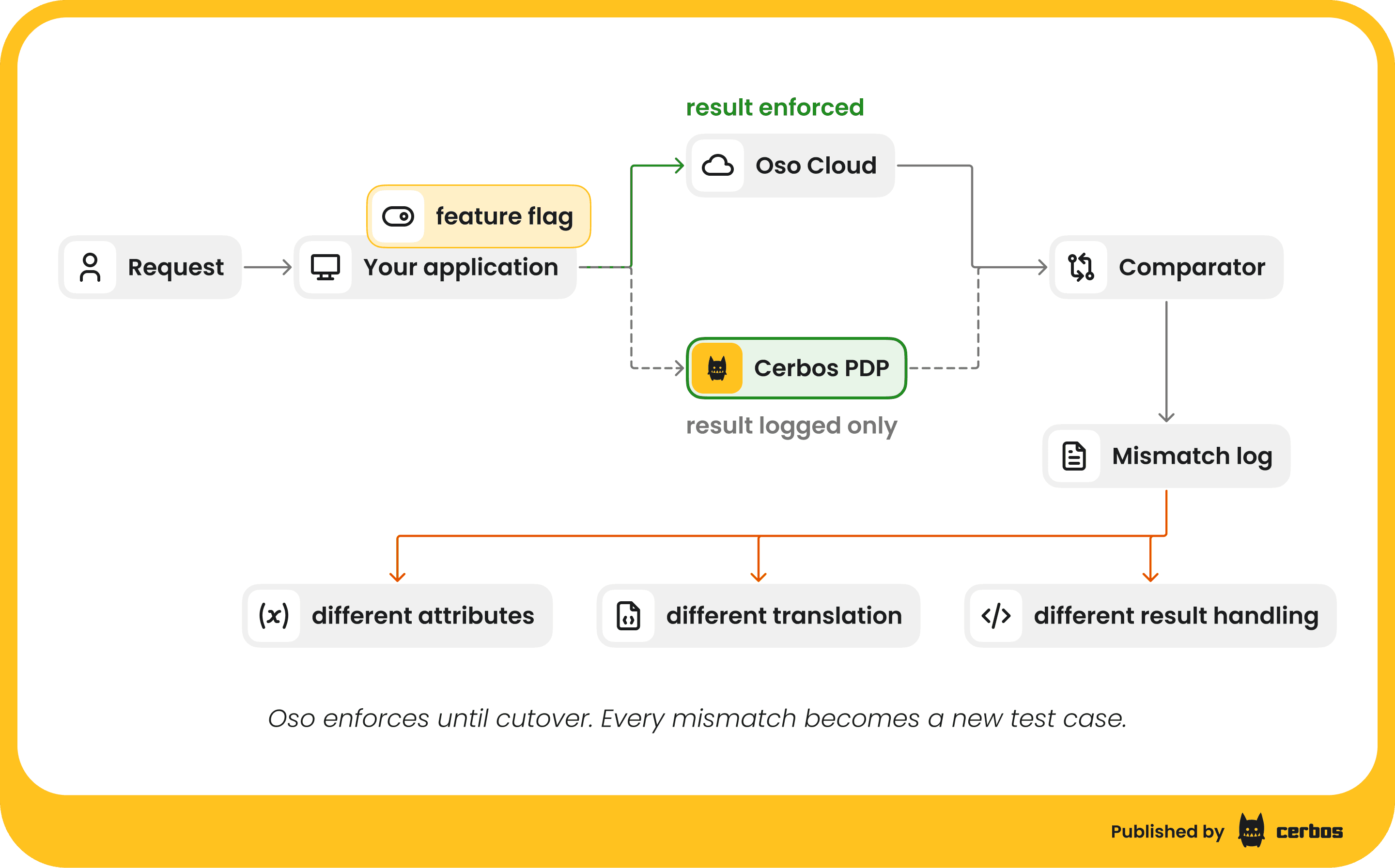
Once one resource type is translated and its tests pass, run Cerbos next to Oso on real traffic without enforcing its answer. Oso keeps deciding, Cerbos decides in parallel, and every disagreement is logged.
async function canPush(user, repo) {
  const osoResult = await oso.authorize(
    { type: "User", id: user.id },
    "push",
    { type: "Repository", id: repo.id },
  );

  cerbos
    .isAllowed({ principal: toPrincipal(user), resource: toResource(repo), action: "push" })
    .then((cerbosResult) => {
      if (cerbosResult !== osoResult) {
        logger.warn("authz_mismatch", {
          user: user.id,
          repo: repo.id,
          action: "push",
          osoResult,
          cerbosResult,
        });
      }
    })
    .catch((err) => logger.error("cerbos_shadow_error", err));

  return osoResult; // Oso enforces until cutover
}
Every mismatch has one of three causes. The request sent Cerbos different attributes than the facts Oso held, the policy was translated differently, or your code reads the result differently. Check the first cause before the others, because a fact that was only ever written to Oso Cloud, or an attribute missing for some users, is the easiest thing to overlook. Each mismatch you fix becomes a new test case. Start with simple endpoints, put the Cerbos path behind a feature flag, and move on only when the mismatch log stays empty under normal traffic. Do the same for list endpoints by sampling requests, running both list_local and the Cerbos filter, and comparing the IDs each returns.
Shadow mode is also when you measure latency in your real deployment topology. Cerbos PDP runs in your infrastructure as a sidecar, a service or a DaemonSet, so a check never leaves your network, and as a sidecar it never leaves the pod. Any Synapse lookup adds a database query to the request path, so watch those numbers and set a cache lifetime for each lookup.
Cutting over to Cerbos and decommissioning Oso
Cut over one resource type at a time. When decisions, list results, latency and behavior with missing attributes all meet your acceptance criteria, flip the flag so Cerbos enforces, and keep calling Oso in shadow for a while in the other direction, so mismatches stay visible after the switch and the flag can flip back. Then repeat for the next resource type. The first resource type takes the longest, because it settles the request shape, the helpers and the comparison harness, and every later one reuses them.
Before the first cutover, send the audit logs to Cerbos Hub or your own pipeline (Cerbos can write them to a file, Kafka or Hub), so the record of each decision starts on day one. Save any Oso decision history you need before you switch Oso off, because it does not move across on its own. From then on a permission change ships as a pull request to your policy repository rather than an application deploy.
When the last resource type has moved, remove the Oso SDK calls, the fact writes, the Oso Sync configuration and any Local Authorization configuration that nothing reads any more.
Common challenges when migrating from Oso, and how to solve them
Scoped roles everywhere. If most of your Polar is roles on resources, the derived role pattern above covers it, with one list per role on the principal. Watch the size of those lists. For a user who belongs to tens of thousands of organizations, have Synapse look up the single relationship for the resource being checked instead of sending every ID.
Facts that only live in Oso Cloud. These show up as shadow mode mismatches for a subset of users. Find them early by exporting each fact type and diffing it against your own tables.
Deep or recursive relationships. Precompute ancestor IDs with a recursive query and check them with a list condition. For models that are mostly graph traversal, decide early whether that part belongs in Cerbos.
Missing attributes. Polar fails closed when a fact is absent. In Cerbos an allow rule whose attribute is missing does not match either, so the user is denied, which is safe but hides bugs as silent denies. Define attribute schemas with enforcement set to reject, so a request with a missing or mistyped attribute is turned away loudly, and a deny rule such as the banned check always has the attribute it reads.
Business logic inside Polar. Rules that compute values rather than check them are better as attributes your application or Synapse provides, which keeps the policy readable to the people reviewing it.
Planning your migration from Oso
Start with the resource type that has the fewest fact types and call sites, not the most important one, so the request shape and helpers are settled before the hard cases.
Most of the effort goes into the data mapping and the side-by-side comparison, not the YAML, and that is why it helps to start before your renewal conversation. You go into it with one resource type running on Cerbos against your own traffic, and a mismatch log that shows how close the rest is.
Book a migration session and bring one of your Polar policies, however messy. We will model it in Cerbos with you, port its tests, and show the decisions side by side. If you would rather start on your own, try Cerbos to build and test your translated policies.
Go deeper:
FAQ
Tagged in