At every conference someone eventually asks "do you actually use Cerbos yourselves?" Fair question to put to a vendor. The answer is yes, in more places than fit in one post, so we’re writing them up as a series. This one covers CerbWiki, the internal knowledge base our team queries through an MCP server. Everyone who connects through MCP signs in with their Google Workspace account, every tool call goes through a Cerbos policy decision point, and every decision is logged in Cerbos Hub.
This post walks through how it's wired up. It's a real production example of authorizing an MCP server rather than a demo repo, and a few of the choices we made along the way (who the principal is, what goes in the audit log, where the policy lives) are choices any team building internal agent tooling has to make. Some make them by accident.
This post is part of a series on how we use Cerbos inside Cerbos. We’ll link the other posts here as they go live.
What CerbWiki is and why an internal MCP server needs authorization
CerbWiki is our company brain for marketing and product management. It's a snapshot of an Obsidian vault with our internal wiki, research notes, and a Markdown mirror of the product docs, with an agent built on the Claude Agent SDK sat on top of it. The whole thing is a TypeScript service on Cloud Run, which scales to 0 when no one is asking it anything (most of the weekend).
The primary interface is an MCP server. It exposes a handful of tools. search does a ranked keyword search over the vault and read returns one file by path. Neither involves a model, they're plain lookups. ask is the different one. It runs a full agent loop inside the service, built on the Claude Agent SDK with the vault as its working directory and its own set of tools (file reads, greps, web fetches, and a handful of read-only BigQuery tools for internal analytics questions), and hands back a finished, cited answer.
Why bother running an agent inside the service when the caller is usually an agent already? Two reasons. Not every caller has an agent or vault access. The Slack bot is the obvious case. Someone @mentions CerbWiki in a channel, the same reply pipeline runs the same agent loop, and it uploads the cited files into the thread because Slack-only askers can't read the vault themselves. And even for MCP callers, ask turns a dozen search-then-read round trips into one call with conversation continuity, which matters when the client's tool timeout is measured in seconds.
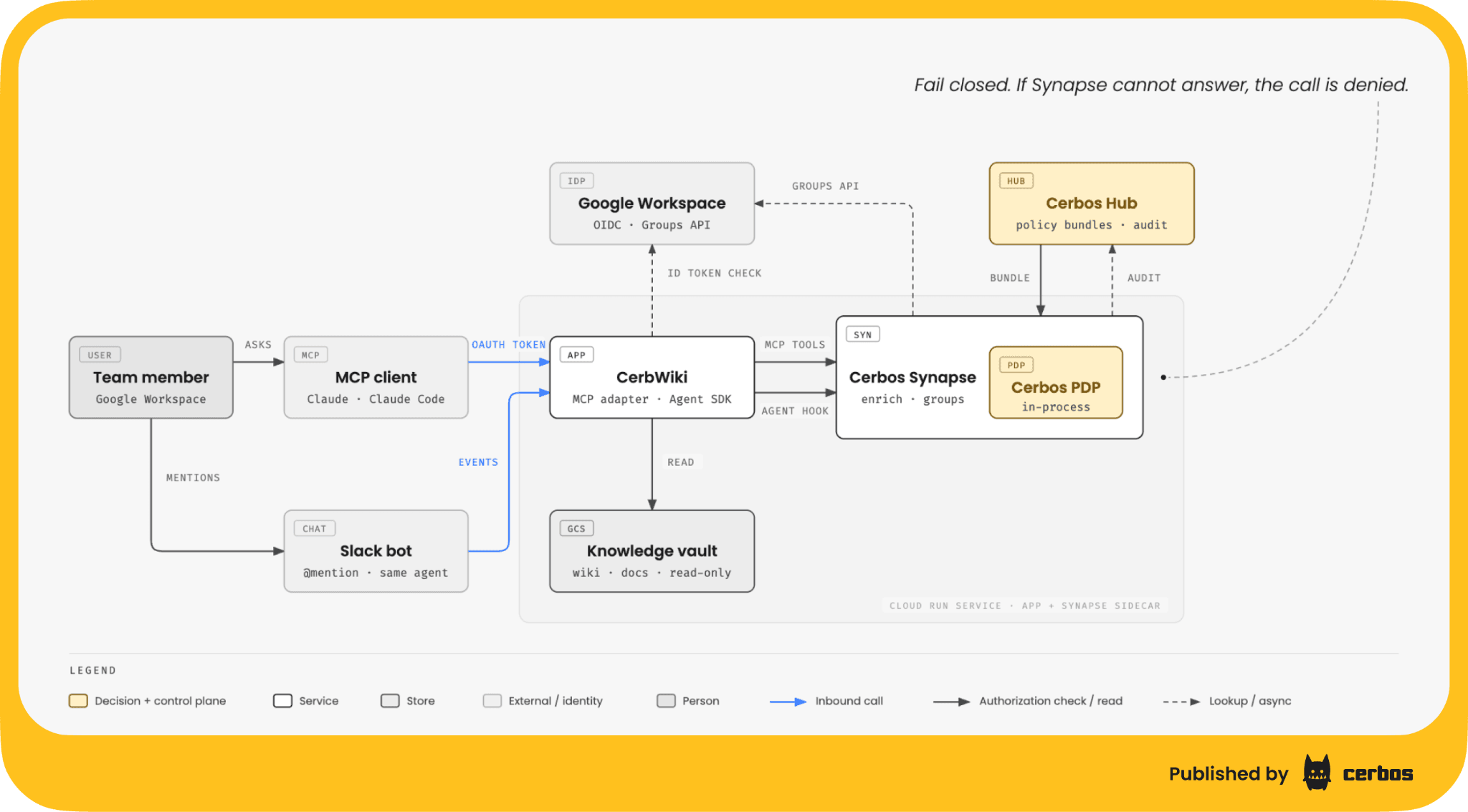
So there are 2 ways in (MCP clients like Claude and Claude Code, and Slack) and one agent loop behind both. That gives 2 surfaces to worry about. What a person's client calls through MCP, and what the agent inside the service calls while answering (file reads, greps, web fetches, warehouse queries). Both needed a gate, and I didn't want 2 different gates.
Google Workspace sign in gives every MCP call a named person
The MCP spec expects OAuth for remote servers, so CerbWiki runs a small authorization server that MCP clients talk to. Google does the identity check inside the consent step. You click "sign in with Google," the server validates the ID token, checks if the email is verified and belongs to our Workspace domain, and mints a short-lived token with your email as the subject. The Google consent screen is set to internal, so Google refuses accounts outside the domain before we even see them.
There's still an automated caller path for workloads that can't sign in as a person (a scheduled job, a CI step). Those callers are labeled as exactly that in every check and every log line, so they never masquerade as a human.
The point of all this is that authorization without identity is just roles on a shared token. Every check that follows has a real person on it, or an explicit "no person here" marker.
Why a headless agent’s authorization sits outside the agent loop
The agent inside CerbWiki runs headless with the SDK's interactive permission prompts switched off. There's no one sitting there clicking "allow" on a Cloud Run instance at 2am. So the question of what stops it doing something daft is a real one, and "the system prompt tells it not to" is not an answer I'd give a customer.
Instructions in the prompt are probabilistic. The model reads them, weighs them against the goal, and sometimes decides the goal wins. There are enough public post-mortems of coding agents doing exactly that, including ones where the agent could recite the rule it had just broken, that this stopped being a theoretical concern a while ago. Every major coding agent platform has arrived at the same fix, pre-execution hooks that evaluate tool calls before they run outside the reasoning loop. That wasn't coordinated. It's what works.
The same shape appears across agent frameworks, research demos and our own customer conversations. The agent is a dumb LLM in a sandbox, the trust boundary is the tool invocation, and a deterministic policy engine is the source of truth. The agent contains no authorization logic at all. Every proposed tool call passes through an enforcement point that asks an external decision point, and a deny comes back to the model as an observation with a reason, so it replans instead of the run dying.
That's the split in CerbWiki. The PreToolUse hook is the enforcement point inside the SDK runtime, the PDP is the source of truth, and the agent never sees the policy. The intent sentence it writes on each call is evidence for the audit trail and has no bearing on whether the call is allowed. The determinism is the security property. A control that catches most of the bad calls is not a control.
One Cerbos policy checks MCP tool calls and the agent’s own tool calls
Cerbos Synapse runs as a sidecar container on the same Cloud Run service, reached over localhost, with the Cerbos PDP running in-process inside it. The app sends every check to Synapse, Synapse enriches it and evaluates it against the policy right there, no second hop. (Yes, a sidecar. We've written about the trade-offs and for a single service this is the simplest thing that works.)
There are 2 enforcement points and they send the identical check. The MCP adapter checks before ask, search, read or a BigQuery tool runs. The agent has a PreToolUse hook that checks before the model uses any of its own tools. That hook fires even when the SDK's interactive permission prompts are bypassed, which they have to be in a headless service, so it's the actual control on what the agent can touch. A deny goes back to the model as the permission decision with the reason attached, so it replans rather than the run falling over. It's the same pattern we use for governing coding agents with Synapse, just wired directly into the SDK here.
Both are fail-closed. If Synapse can't answer, the call is denied, because an authorizer that's down should never quietly become an uncontrolled agent.
The check itself is deliberately boring. The resource is kind tool with the tool name as its ID, plus a sanitized summary of the input (file path, query, truncated SQL) and which surface the call crossed. The action is call. The roles say whether this is the agent's own tool use or an externally exposed MCP tool.
The principal is the person, the actor is the workload
Decide this one early. When I ask CerbWiki a question and the agent reads a file on the way to an answer, who is the principal on that check?
We followed the delegation model from RFC 8693 and the OAuth actor profile draft. The principal is the authorizing subject, so the human's email when they signed in with Google, or the conversation ID when there isn't a human. The principal carries an act attribute naming the actor doing the work, which is the Cloud Run service account the workload runs as. The request is authorized as the person, with the service named as the thing acting on their behalf.
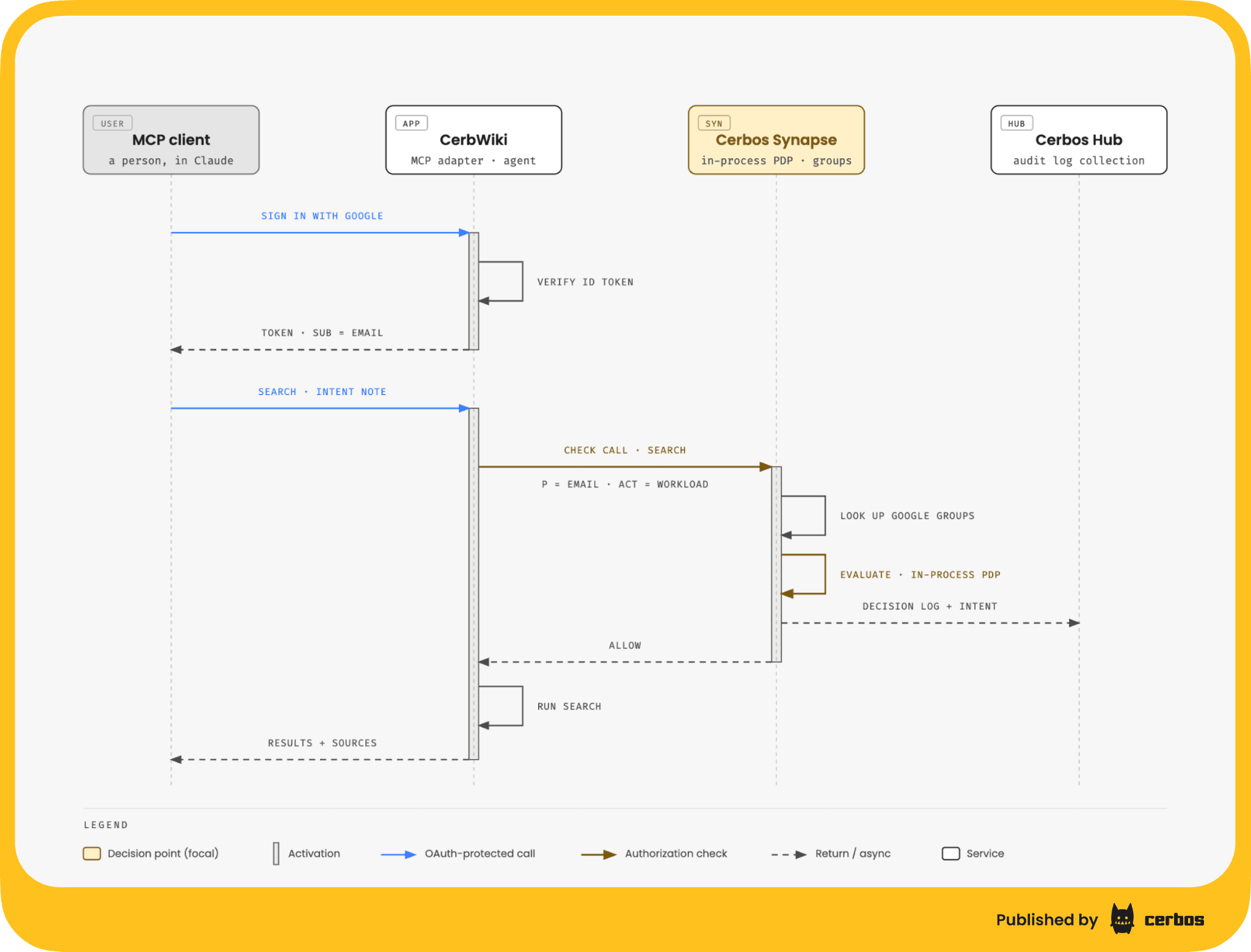
That shape means both halves of the principal are available to the policy, and the rules below lean on both. It also means the chain doesn't go dark at the agent boundary, which is the problem I've been banging on about all year with customers.
Here's a version of the policy that uses both. One extra ingredient, and it's Synapse's job. The check doesn't carry the person's groups, and neither does the token. Synapse, with the PDP in-process, takes the check and, for a federated person, calls the Google Groups API from a custom data source for their current memberships and attaches them to the principal as a groups attribute before the policy is evaluated. The lookup happens at decision time, so when someone leaves a group the next call already knows, and nothing about groups lives in the app. The actor's service account is on every check already. A derived role turns "a real person in the data-team group" into something the resource policy can name.
apiVersion: api.cerbos.dev/v1
derivedRoles:
  name: cerbwiki_callers
  definitions:
    # A real person, signed in with Google, who is in the data-team group.
    - name: data_team
      parentRoles: ["mcp-client", "wiki-agent"]
      condition:
        match:
          all:
            of:
              - expr: P.attr.sub_profile == "user"
              - expr: '"data-team@example.com" in P.attr.groups'
The resource policy then combines the person and the workload. Warehouse queries need a data-team person, and the request has to arrive through the production workload. A dev instance of CerbWiki running under a different service account can't reach the warehouse even with a perfectly valid person behind it. The agent can only go to the web when it's working for a signed-in person, so an automated caller never gets a web-fetching agent (which itself is authorized on a per-request, per-domain basis). Everything else stays open to any authenticated caller.
apiVersion: api.cerbos.dev/v1
resourcePolicy:
  version: default
  resource: tool
  importDerivedRoles: [cerbwiki_callers]
  variables:
    local:
      is_person: has(P.attr.sub_profile) && P.attr.sub_profile == "user"
      prod_workload: 'P.attr.act.sub == "cerbwiki@example-project.iam.gserviceaccount.com"'
      warehouse_tool: 'R.id.startsWith("bq_")'
      web_tool: 'R.id in ["WebFetch", "WebSearch"]'
  rules:
    # Warehouse queries need a data-team person AND the production workload.
    - name: warehouse-queries
      actions: ["call"]
      effect: EFFECT_ALLOW
      derivedRoles: [data_team]
      condition:
        match:
          all:
            of:
              - expr: V.warehouse_tool
              - expr: V.prod_workload

    # The agent only goes to the web when it is working for a signed-in person.
    - name: web-needs-a-person
      actions: ["call"]
      effect: EFFECT_DENY
      roles: [wiki-agent]
      condition:
        match:
          all:
            of:
              - expr: V.web_tool
              - expr: '!V.is_person'

    # Everything else (vault search, read, the agent's file tools) is open
    # to any authenticated caller.
    - name: vault-tools
      actions: ["call"]
      effect: EFFECT_ALLOW
      roles: ["*"]
      condition:
        match:
          expr: '!V.warehouse_tool'
Cerbos is default-deny, so anything not matched by an allow is refused, and an explicit deny always beats an allow. The variables at the top are there so each rule reads as a sentence. The test suite next to it pins down the 4 cases I care about. A data-team person through production is allowed, the same person through a dev workload is denied, a person outside the group is denied, and an automated caller is refused the web.
The first version of the policy allowed everything from trusted authenticated users, and that was deliberate. From day 1 every call produced a logged, attributed decision, and a few weeks of watching what people (and the agent) actually did told us where to tighten. Observe, then enforce. Tightening is a policy edit, not a code change, which is the whole reason to put the facade in before you need it.
Cerbos Hub audit logs record the agent’s stated reason for every call
The in-process PDP writes both access logs and decision logs. The sidecar's audit backend is set to Hub, which ships them up for collection in Cerbos Hub and also pipes the same stream to stdout, so Cloud Logging keeps a copy next to the app's own logs. Same trail, 2 places.
Every MCP tool CerbWiki exposes has a required displayText parameter. The calling agent has to write 1 sentence on why it's making this particular call. It doesn't change the result. It exists purely for the trail. Since PDP 0.51 you can attach request context annotations to a check that are recorded on the audit entry but invisible to policy conditions, so that sentence rides onto the Cerbos decision along with the request ID, the conversation ID and the Cloud Trace.
An audit entry in Hub therefore reads roughly as "jane@example.com, via the CerbWiki workload, called search because it was finding the pricing page for a deck, and was allowed." Who, through what, did which thing, why, and what we decided. That's the replayable trail I keep telling people they need for agents, and it came with the decision rather than needing a separate logging effort.
Hub's Insights view sits on top of the same data, which is where I go to see which tools get called, by whom, and how often the agent goes looking before it answers (a lot, it turns out).
Policy changes ship through Cerbos Hub, not through code deploys
The policy and its tests live in the CerbWiki repo, and the repo is connected to a policy store in Cerbos Hub. Every push runs Hub's own CI pipeline. Hub picks up the change, validates the policy set, runs the test suite, and only builds a new bundle when everything passes. If a test fails the build is blocked and the previous bundle stays live, so a broken policy never gets as far as the sidecar. There's no pipeline YAML for any of this in the repo.
The sidecar's storage driver is set to Hub, so it pulls its policy bundle from a Hub deployment rather than from a directory baked into the image. The Hub client credentials sit in Secret Manager and are passed to the PDP to authenticate to Hub. The sidecar shows up in Hub's decision point monitoring under its own name, so I can see when it last pulled a bundle and whether it's healthy, what policy versions are running and other operational metrics.
Changing who can do what means merging a policy change. Hub builds the bundle and the sidecar picks it up. No container rebuild, no new Cloud Run revision. The GitOps argument for authorization is one we've made for years and it holds up fine on a 15-person team's internal tool.
Next for CerbWiki, an LLM gateway and OpenTelemetry tracing
Two things are on the list.
Put an LLM gateway in front of the model calls. Today the agent talks to the model API directly from the service. A gateway gives us one place to apply the same policy checkpoint to model traffic, to route between models, and to see token spend per person rather than per service. We've written about governing agents at the gateway.
Turn on OpenTelemetry end to end. The PDP already supports tracing, and the app already stamps the Cloud Trace ID onto every decision as an annotation. Wiring the app, Synapse and the PDP into one trace means a slow answer can be walked from the Slack mention through each tool call and each authorization decision without grepping two log streams. It also gives us a live view of which decisions are being made and how often, which is the input for the next round of policy tightening.
What I'd tell anyone building an internal MCP server
Get real identity on the token before anything else. If your MCP server authenticates with one shared key, every authorization decision downstream is a decision about "the key," and the audit trail says so. Google sign-in inside the OAuth consent step took an afternoon, and every check and log line after it got a name on it.
Gate both surfaces with the same check. The tools you expose are the obvious place. The tools your agent uses internally get forgotten, and the agent is what will surprise you. One policy, one resource kind, one decision shape.
Log the intent, not just the action. A required 1-sentence "why" on every tool call costs the calling agent nothing and turns an audit log from a list of verbs into something a person can actually read 6 months later.
The same pattern applies to any internal MCP server. It's the dynamic authorization for MCP servers pattern we work through with customers, and it's the same Cerbos authorization management platform they use. We just happen to be the customer this time.
Try Cerbos to put the same policy checkpoint in front of your own MCP server, or book a call if you'd rather walk through your setup with us.
FAQ
Tagged in