Your engineering team is probably already shipping faster with Claude Code. Agents are writing tests, refactoring modules, spinning up infrastructure. But here's a question worth asking in the standup: what exactly did those agents do yesterday?
Claude Code has a hooks system that lets you intercept tool calls before and after they happen. It's good. But it's a local config, per-developer, and there's no central way to enforce it. No audit trail. No policy-as-code. If your security or IAM team asks "can you prove no AI agent accessed production secrets last quarter?" you're stuck grepping local logs across 50 laptops.
Current IAM systems like access management, IGA, and PAM were not designed to evaluate decisions at the level of individual tool calls in real time. That layer of control is missing, and AI agents are already operating within that gap. We built a way to fill it.
What Synapse does here
Cerbos Synapse ships with a built-in Claude Code hook handler. Every time Claude Code tries to use a tool (read a file, run a command, write something), the hook fires, hits Synapse, and Synapse runs a Cerbos policy check against it.
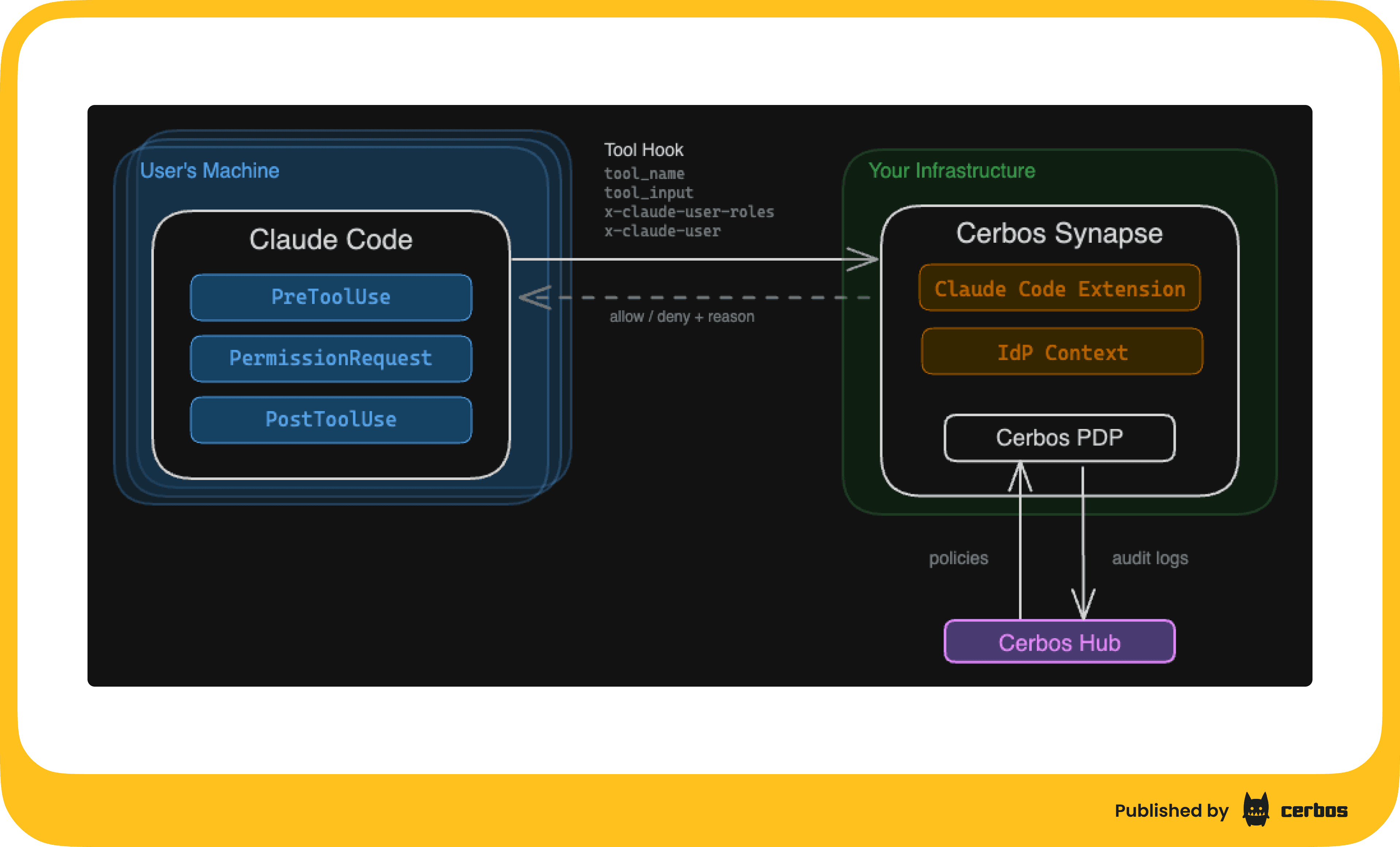
The mapping is clean:
- Hook event name (PreToolUse, PostToolUse, etc.) becomes the resource kind
- Tool name (Bash, Read, Write, etc.) becomes the action
- Headers you set in the hook config become the principal (who's doing this and what roles they have)
- The full hook payload lands in resource attributes, so your policies can inspect file paths, command arguments, anything
Every decision (allow, deny, or no-match) gets logged. Connect Synapse to Cerbos Hub and those logs stream to a central store where you can search, filter, and build compliance reports.
Policies live in Hub too. Update a policy, it distributes to every Synapse instance automatically. No restarts. No config pushes. No Slack messages asking developers to pull the latest settings.
Here's a 3 minute walkthrough of the whole thing in action and a detailed product page:
Setting it up
1. Configure Synapse
Add the Claude route extension to your Synapse config. If you're already running Synapse as your authorization gateway, this is 6 lines of YAML bolted onto your existing config.
server:
  listenAddress: ":3594"

pdp:
  inProcess:
    hub:
      credentials:
        clientID: "${CERBOS_HUB_CLIENT_ID}"
        clientSecret: "${CERBOS_HUB_CLIENT_SECRET}"
        pdpID: "claude-demo"
    storage:
      driver: hub
      hub:
        remote:
          deploymentID: "${CERBOS_HUB_DEPLOYMENT_ID}"
    audit:
      enabled: true
      accessLogsEnabled: true
      decisionLogsEnabled: true
      backend: hub
      hub:
        storagePath: /tmp/cerbos-audit
    engine:
      defaultPolicyVersion: default

extensions:
  routeExtensions:
    claude:
      extension:
        extensionURL: "system://claude"
      routes:
        "/claude": ["POST"]
The system://claude extension URL tells Synapse to use the built-in handler. The route maps /claude to POST requests. Synapse serves all route extensions under the /ext/ prefix, so the full URL becomes /ext/claude.
2. Enforce hooks across every developer with server-managed settings
This is the critical step. Claude Code supports server-managed settings: configuration that your organization pushes to every developer's machine via MDM (Jamf, Intune, etc.) or a managed config file. Settings delivered this way cannot be overridden locally. Developers can't remove the hook, can't point it somewhere else, can't skip the policy check.
This matters because if you rely on developers opting into the hook config via their local .claude/settings.json, someone will forget. Or remove it because it's "slowing them down." Or never set it up in the first place. Server-managed settings close that gap.
Your managed settings file contains the hook configuration:
{
    "hooks": {
        "PreToolUse": [
            {
                "matcher": "*",
                "hooks": [
                    {
                        "type": "http",
                        "url": "https://synapse.internal:3594/ext/claude",
                        "headers": {
                            "x-claude-user-roles": "marketing",
                            "x-claude-user": "${USER}"
                        }
                    }
                ]
            }
        ],
        "PermissionRequest": [
            {
                "matcher": "*",
                "hooks": [
                    {
                        "type": "http",
                        "url": "https://synapse.internal:3594/ext/claude",
                        "headers": {
                            "x-claude-user-roles": "marketing",
                            "x-claude-user": "${USER}"
                        }
                    }
                ]
            }
        ],
        "PostToolUse": [
            {
                "matcher": "*",
                "hooks": [
                    {
                        "type": "http",
                        "url": "https://synapse.internal:3594/ext/claude",
                        "headers": {
                            "x-claude-user-roles": "marketing",
                            "x-claude-user": "${USER}"
                        }
                    }
                ]
            }
        ]
    }
}
Deploy this via your MDM tool of choice. On macOS with Jamf, it's a managed plist. On Windows with Intune, it's a registry key. The server-managed settings docs cover the specifics for each platform.
The x-claude-user-roles header is where it gets interesting. You can set it statically per team ("engineer", "marketing") or pull it dynamically from your identity provider. This becomes the principal role in Cerbos, so your policies can make different decisions for different groups of people. The x-claude-user header maps to the principal ID, so audit logs show exactly which developer's agent made each request.
3. Start in observe mode
Here's the part I think most people will skip and shouldn't.
Don't write any policies yet. Just deploy Synapse with the hook wired up and audit logging flowing to Hub.
With no policies defined, everything gets allowed by default. But every single tool call, every file read, every Bash invocation, all of it shows up in your Cerbos Hub audit logs. You get a complete picture of what Claude Code actually does across your org before you write a single rule.
This is your dry run. Let it cook for a week. Look at the data. You'll probably be surprised by what you find.
4. Write your first policy: protect sensitive files
After a week of observation, you know what Claude Code does. Now you can make informed decisions about what it should and shouldn't do.
Start with the universal rule: block sensitive file access for everyone, regardless of role.
apiVersion: api.cerbos.dev/v1
resourcePolicy:
  resource: PreToolUse
  version: default
  rules:
    - actions: ["Read", "Write", "Edit"]
      effect: EFFECT_DENY
      roles: ["*"]
      condition:
        match:
          any:
            of:
              - expr: R.attr.tool_input.file_path.startsWith("/etc")
              - expr: |-
                  R.attr.tool_input.file_path.matches(".*\\.env.*")
              - expr: |-
                  R.attr.tool_input.file_path.matches(".*secret.*")
              - expr: |-
                  R.attr.tool_input.file_path.matches(".*credentials.*")
      output:
        when:
          ruleActivated: |-
            {"hookSpecificOutput": {"permissionDecision": "deny", "permissionDecisionReason": "Access to sensitive files is restricted by organization policy."}}

    - actions: ["*"]
      effect: EFFECT_ALLOW
      roles: ["*"]
Push this to Hub. It distributes to your Synapse instances. Done.
Now when any user's agent tries to read .env.production:
● Read(.env.production)
  ⎿  PreToolUse:Read hook returned blocking error
  ⎿  Access to sensitive files is restricted by organization policy.
The agent gets a clear reason why it was blocked and adapts. The user sees exactly what happened. The audit log captures the attempt, the denial, and the reason. Everything else still works normally.
5. Add role-based controls
Universal rules are a starting point. Real orgs need nuance.
Your engineers need Bash and write access for legitimate work. Your marketing team just needs to read code and search. You control this through the x-claude-user-roles header in the hook config, set per team through MDM or server-managed settings:
"headers": {
    "x-claude-user-roles": "engineer",
    "x-claude-user": "alex@company.com"
}
Now add role-specific rules above the catch-all. Marketing gets denied Bash, Write, and Edit. Engineers get everything:
    - actions: ["Bash"]
      effect: EFFECT_ALLOW
      roles: ["engineer"]
      output:
        when:
          ruleActivated: |-
            {"hookSpecificOutput": {"permissionDecision": "allow"}}

    - actions: ["Bash", "Write", "Edit"]
      effect: EFFECT_DENY
      roles: ["marketing"]
      output:
        when:
          ruleActivated: |-
            {"hookSpecificOutput": {"permissionDecision": "deny", "permissionDecisionReason": "This tool requires the engineer role. Contact your platform team to request access."}}
Same Cerbos policy language you'd use for any other authorization decision in your stack. If you're already using Cerbos for your application's access control, this is the same mental model applied to AI agents.
6. Go further with command-level guardrails
Allowing Bash for engineers doesn't mean allowing every command. You can inspect the actual command string and block the destructive ones, even for trusted roles:
    - actions: ["Bash"]
      effect: EFFECT_DENY
      roles: ["engineer"]
      condition:
        match:
          any:
            of:
              - expr: R.attr.tool_input.command.matches(".*rm\\s+-[a-zA-Z]*r.*")
              - expr: R.attr.tool_input.command.matches(".*(curl|wget).*\\|.*(bash|sh).*")
              - expr: R.attr.tool_input.command.matches(".*git\\s+push.*(--force|-f\\s).*")
              - expr: R.attr.tool_input.command.matches(".*git\\s+reset\\s+--hard.*")
      output:
        when:
          ruleActivated: |-
            {"hookSpecificOutput": {"permissionDecision": "deny", "permissionDecisionReason": "This command has been blocked by organization security policy."}}
git status runs fine. git push --force origin main gets blocked. rm -rf / gets blocked. The policy uses regex patterns on R.attr.tool_input.command to draw a line between safe and dangerous. Add patterns as you discover new risks from your audit logs.
The operational model
Once this is running, the day-to-day looks like this:
-
Policies live in Cerbos Hub as code. They're versioned, testable (Cerbos has a built-in test framework), and go through the same review process as any other code change. Want to allow a new tool? PR the policy, get it reviewed, merge it, and it's live across the org.
-
Audit logs flow to Hub automatically. Every allow, every deny, every no-match. Searchable, filterable, exportable. When the compliance auditor asks what your AI agents had access to last quarter, you pull a report instead of running grep across 50 laptops.
-
The feedback loop is tight. Developers hit a block, the reason is clear, they either use an alternative tool or request a role change. Platform team sees the denied requests in the audit log and can make informed decisions about whether to loosen or tighten policies.
Why this matters
This changes how you control agent behavior in practice. The impact shows up immediately in a few areas: security, compliance, different access types, and progressive rollout:
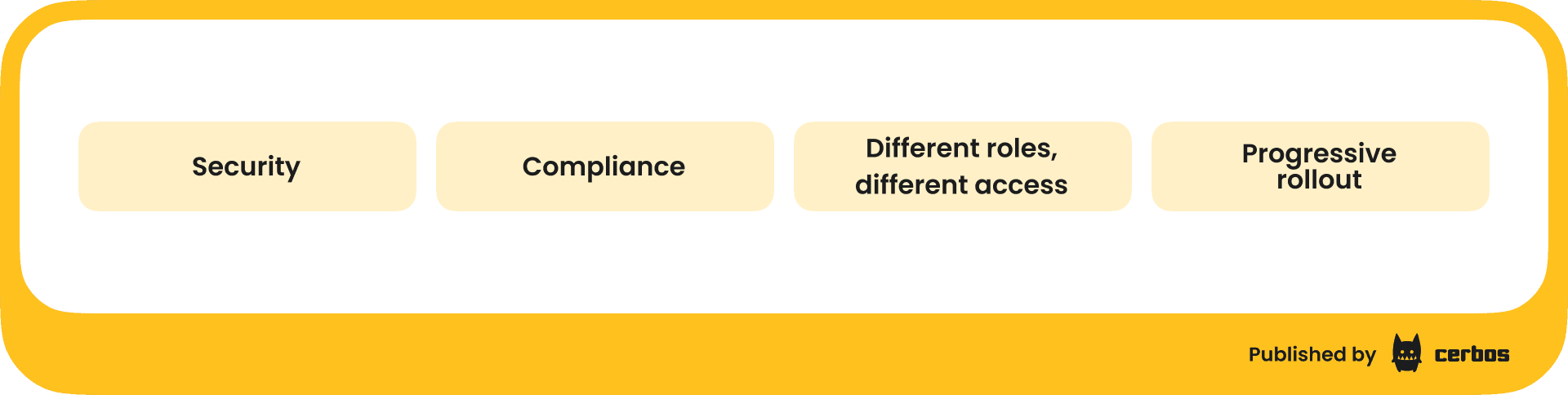
| Area | Details |
|---|---|
| Security | AI agents can run arbitrary code and read any file on the machine. A single user action can trigger hundreds of authorization decisions as agents chain tool calls together. Without guardrails, a prompt injection or a confused agent can read your .env files, run destructive commands, or poke around in directories it has no business being in. Synapse puts a policy boundary around every action, with an external policy decision point evaluating each request. |
| Compliance | SOC 2, ISO 27001, and friends all want to know who accessed what and when. "An AI agent" isn't a satisfying answer for auditors. With Synapse, you have a timestamped, searchable log of every action every agent took, tied to the user who invoked it, with the policy decision and reason attached. Gartner expects 25% of enterprise breaches will trace back to AI agent abuse by 2028. This gets you ahead of that. |
| Different roles, different access | Your engineers and your marketing team shouldn't have the same agent permissions. Engineers need Bash and write access. Marketing needs read-only exploration. Synapse lets you express that in policy, not in per-machine config files that someone will inevitably forget to set up. |
| Progressive rollout | You don't have to boil the ocean. Start with observe mode. Look at the data. Write a few targeted policies. Expand from there. The observe-then-enforce pattern means you're making decisions based on real usage data, not guesswork. |
What's next
AI coding agents are going to get more capable, not less. They'll manage infrastructure, deploy services, interact with production systems. The user base will keep expanding beyond engineering. The teams that figure out governance early, while the IAM industry is still catching up, will have a head start when that happens.
Synapse gives you that governance layer without slowing anyone down. Same Cerbos policies your team already knows. Central management through Hub. Full audit trail. And it takes about 20 minutes to set up.
If you want to try it, grab a Synapse licence and follow the setup above. The Claude route extension is built in; you just need to turn it on.
FAQ
Tagged in