AI agents are no longer confined to just retrieving information - they’re now expected to take action. Thanks to emerging standards like the Model Context Protocol, modern AI agents, powered by LLMs, can interact with external tools and APIs instead of only producing text.
MCP essentially acts as a bridge between an AI model and real-world services, enabling the agent to execute commands, fetch data, and perform transactions on a user’s behalf. This new capability unlocks powerful applications but also raises a critical question: How do we control what an AI agent can do? In other words, how do we enforce MCP permissions so the agent’s tool access remains safe and within bounds?
In this article, we’ll explore what MCP is and how it works, why MCP permissions are so important, where current approaches fall short, and how adopting fine-grained, dynamic authorization can secure AI agent tool use. The goal is to harness the new power of AI agents safely, giving them exactly the access they need and nothing more.
What is the Model Context Protocol (MCP)?
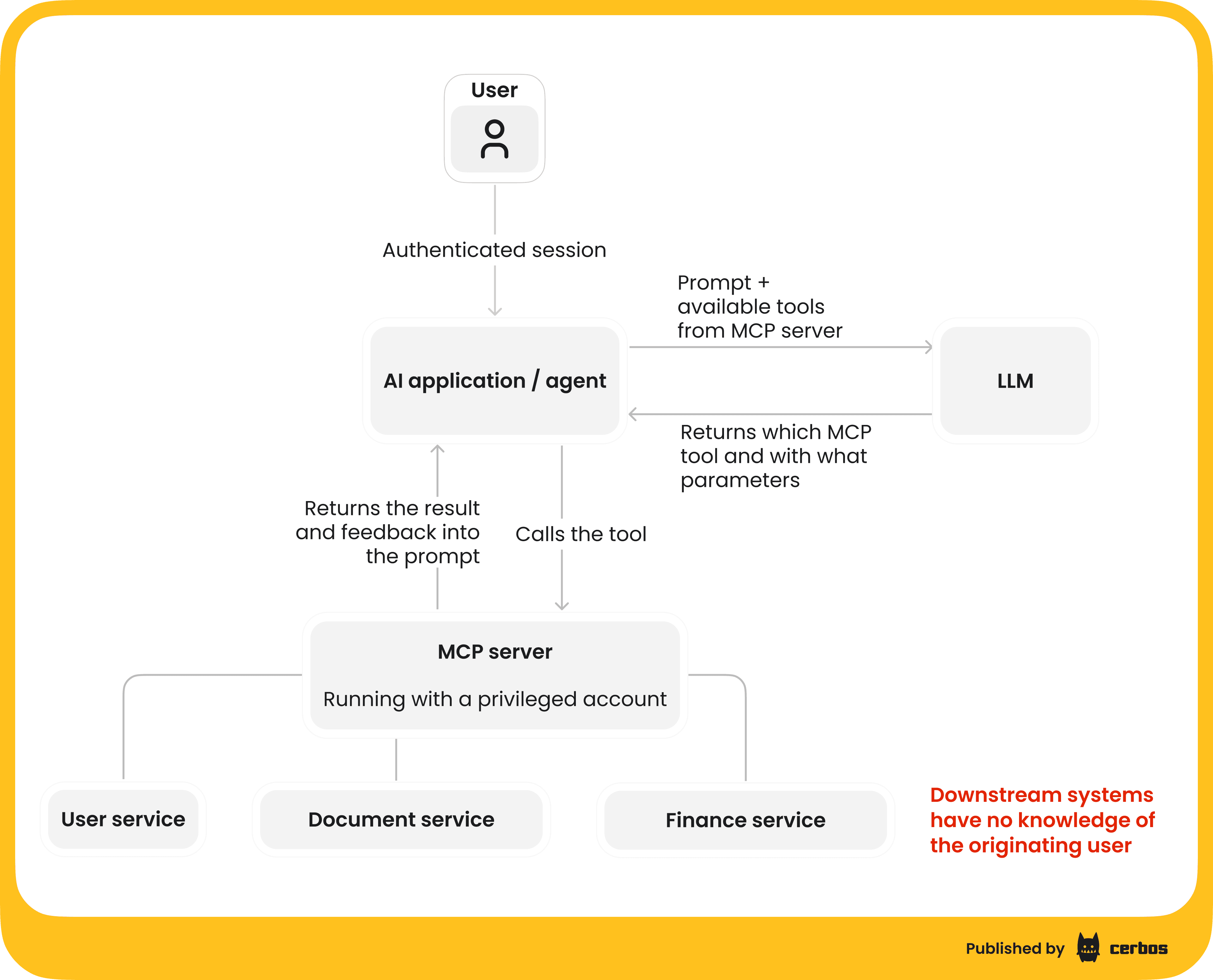
In plain terms, MCP is a universal translation layer that lets AI models use tools and APIs in a standardized way. Large Language Models are great with natural language, but they don’t inherently know how to call, say, the GitHub API or query a database. MCP solves this by defining a common protocol where those external services are exposed as tools or functions the AI can invoke. The AI doesn’t need to understand each service’s API - it just sees a toolkit of actions it can perform, and MCP handles translating those actions into actual API calls.
Under the hood, MCP follows a client-server architecture. Here’s how it works in practice:
| MCP server | A program that hosts a set of tools or actions. Each tool could be something like “read a file,” “send an email,” “query customers DB,” etc. The MCP server acts as a front-end for these functionalities, whether they are local system calls or remote API calls. It standardizes how tools are described and invoked. |
|---|---|
| MCP client | The component that connects to the MCP server. It is often part of the AI agent’s host application. The client maintains a dedicated connection to a server and passes the AI’s requests to it. For example, an AI coding assistant might launch an MCP client for a “filesystem” server which grants it safe access to certain file operations. |
| Host application | This is the environment running the AI agent - for instance, a chat interface like Claude or an IDE like Cursor. The host can spawn multiple MCP clients, connecting to different MCP servers for different domains of functionality. One client-server pair might handle filesystem access, another might handle database queries, and so on. |
| Tools and resources | The MCP server can expose different types of capabilities. It might provide read-only access to resources (like fetching data or file contents), define reusable prompts/workflows, or expose tools that perform actions. Tools are the most powerful - they let an AI agent do things in the real world, from sending a calendar invite to executing a shell command. |
MCP’s design makes it easy to add new capabilities to AI systems in a plug-and-play fashion. It’s gaining traction as a standard way to integrate AI with applications because it promises a secure, interoperable approach.
However, “secure” here assumes we put proper guardrails in place. By default, if you expose powerful tools via MCP, you need to ensure the AI, and ultimately the end-user it represents, only uses those tools in authorized ways. This is where MCP permissions come into play.
MCP permissions - why they matter
MCP permissions refer to the policies and controls that determine who or what an AI agent can do with a given tool. In an ideal world, an AI agent should only be able to perform actions that the actual user behind it is allowed to perform. When an AI agent is acting on behalf of a user, it must operate under a delegated (attenuated) version of that user’s permissions. In other words, the agent shouldn’t magically have more rights than the user themselves. If a regular user isn’t allowed to delete a database record or approve a financial transfer, then the AI agent acting for that user shouldn’t be able to either.
Without proper MCP permission controls, a lot can go wrong. Let’s explore a few scenarios.
Data leaks via prompt injection
AI agents rely on instructions / prompts which can be manipulated by clever attackers. A malicious instruction hidden in a web page or document could trick an agent into using its tools in unintended ways. For example, researchers have shown that an AI agent parsing a webpage might encounter a hidden prompt telling it to email the contents of its memory, including sensitive data or API keys, to an attacker’s address. If the agent has access to an email-sending tool and isn’t restricted in what it can send, it could inadvertently leak secrets. This kind of indirect prompt injection exploit is not theoretical - it’s a demonstrated risk for advanced AI agents that browse or take actions based on external content. Proper permission controls could mitigate this by, say, preventing the agent from sending arbitrary emails or accessing certain data without checks.
Over-broad access and destructive actions
If an MCP server provides a very powerful tool - think of a shell with system-level access or a database admin interface - and the AI agent has unrestricted use of it, the fallout from a mistake or misuse could be severe. A famous cautionary example is using a single “god mode” API token for everything - it might let the agent read and write everywhere in your system. That’s convenient until something goes awry. All it takes is one errant command for an AI agent, or an attacker manipulating it, to drop your production database or wipe out critical data. Real incidents have occurred where overly broad credentials led to massive data exposure and costly remediation. Clearly, we don’t want an AI agent with the equivalent of root access unless absolutely necessary, and even then, every action should be tightly controlled.
Unauthorized transactions or misuse of services
Imagine an AI agent connected to financial transaction APIs. If its permissions aren’t scoped, a user prompt like “Schedule a $10M transfer” could lead the agent to actually attempt it, even if that user doesn’t have clearance for such transfers. In one real-world inspired case, a company’s internal AI assistant mistakenly escalated its privileges and accessed other teams’ data - a confusion of identity known as a confused deputy problem. Essentially, the AI (deputy) was tricked into using higher-level access that it should never have had, exposing data of other accounts. For instance, a malicious MCP server or man-in-the-middle could masquerade as a legitimate tool endpoint, and the AI might send it sensitive information believing it’s trusted - thereby handing data to an attacker. Without robust authentication and permission checks, the agent cannot discern a legitimate tool from a fake one. This underscores the need for mutual trust enforcement (the agent authenticates the server and vice versa) and per-tool authorization rules.
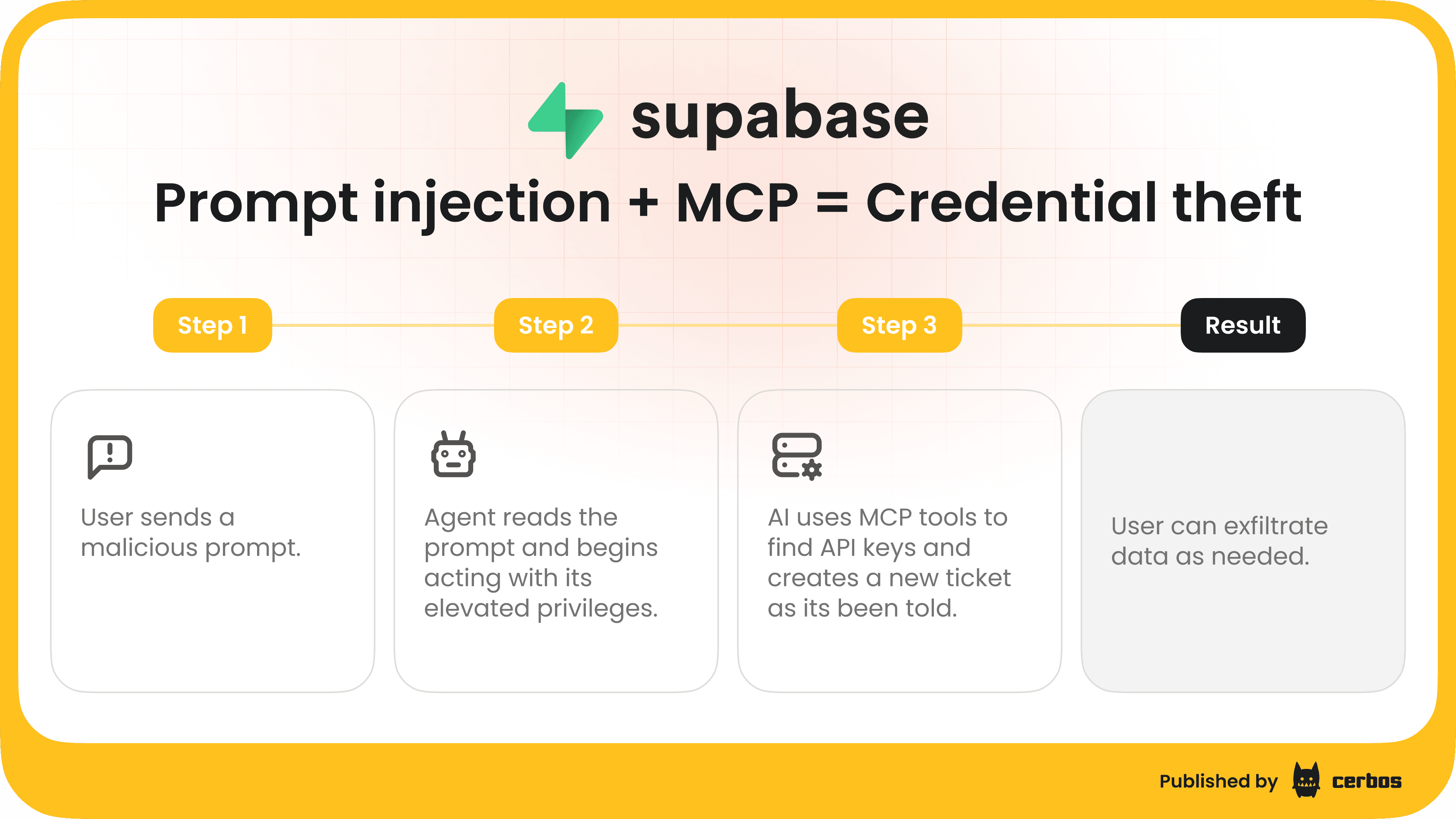
Unchecked AI tool access is a recipe for security nightmares. Leaked customer data, compliance violations, system outages - all are possible if we simply give AI agents free rein.
MCP permissions are about preventing those outcomes. They ensure the AI can only use certain tools, in certain ways, under certain conditions. Essentially, it’s the principle of least privilege applied to AI: give the agent the minimum access it needs to fulfill its task, and nothing more. In the next section, we’ll look at why achieving this isn’t trivial with out-of-the-box MCP setups.
The shortcomings of current MCP implementations
The Model Context Protocol is still a young standard, and early implementations have focused on connectivity and functionality more than fine-grained security. Many existing MCP servers and clients operate under an implicit trust model - originally, they assumed a fairly trusted environment (e.g. a local agent talking to a local tool). In such cases, developers might have used simplistic auth measures or even none at all. But as MCP use expands to remote servers with access to third-party APIs, these limitations become glaring. Here are some key shortcomings.
Limited default authorization support
The MCP specification currently makes authorization optional - it allows secure flows but doesn’t require them for compliance. This means that many MCP setups by default might rely on nothing more than an API key or a trust assumption.
In practice, a lot of developers started by hardcoding an API token or using one static credential to authenticate the agent to the server. Authorization logic - deciding which user or role can invoke which tool, often ends up baked into application code as simple if/else statements or not implemented at all. This is brittle and not scalable. Hardcoding role checks in the MCP server leads to complex, hard-to-manage code and requires redeployments for every policy change. It’s a far cry from the dynamic, context-aware permissions we truly need.
Coarse access tokens and “all-or-nothing” scopes
Early MCP examples often use a single token that, if valid, grants access to the entire toolset. Such coarse-grained access control is convenient but dangerous. Using one broad token or API key as the gate means the agent either has no access or full access - there’s no in-between. As noted, having a single root-level token is extremely risky. Similarly, if all tools are lumped under one scope, you can’t differentiate between, say, “read-only access to files” and “modify database entries”.
The result is over-privileged agents. If that token is ever compromised or misused, the attacker, or misinstructed AI, can do everything. We’ve learned from cloud security that coarse roles like “Administrator” should be used sparingly; yet in the MCP world many agents are effectively running with admin privileges due to simplistic token designs.
Confused deputy and identity mix-ups
The confused deputy problem, which we touched upon previously, arises when an agent or service with higher privileges is tricked into performing an action on behalf of a less privileged entity. In the MCP context, one variant of this is using a single OAuth client identity for all agent requests across users. If your MCP server registers as one static OAuth client, an attacker might exploit existing login sessions to make the agent perform actions without proper user consent.
For example, by reusing a static client ID and redirect URI, an attacker could potentially bypass interactive consent, making the AI agent call APIs with another user’s token (since the authorization server thinks consent was already given).
Another variant is an MCP server acting as a proxy for multiple downstream APIs but not distinguishing them - a malicious tool could piggyback on the agent’s general token to access something it shouldn’t. Without fine-grained audience checks and scope separation, an agent might send a token issued for Service A to Service B, which could be abused if Service B accepts it, or if the token contains more privileges than needed. These nuanced issues are easy to get wrong if you only rely on coarse OAuth flows or static credentials.
Reliance on static roles or code logic
Even when teams do implement some permission logic, it can sometimes be static and simplistic. Maybe you have an “admin” flag that, if true, enables all tools, otherwise only a basic subset. This doesn’t account for contextual rules such as “Manager can approve expense if it’s from their own team”.
It also doesn’t handle dynamic conditions like time of day, request rate, specific resource attributes, etc. Real-world authorization policy tends to be complex, and current MCP samples or frameworks don’t provide a rich policy engine out of the box. They leave it to the application, which can lead to a tangle of conditionals that are hard to audit.
Moreover, any time these rules need changing, say, you want to revoke one particular tool from all users - you would have to change the code or config of the MCP server and redeploy it. This slow, error-prone process is not ideal for security or agility.
In summary, today’s MCP tooling doesn’t inherently prevent the AI agent from overstepping its bounds. There’s a clear need for a better approach: one that brings fine-grained, dynamic authorization to MCP. Instead of one-size-fits-all tokens and hardcoded rules, we want per-tool, per-action decisions that take into account who the user / agent is, what they’re trying to do, and whether they are allowed. Let’s talk about what that solution looks like, and why it’s the way forward.
If you’re looking to safely expose tools to agents without compromising control, reliability, or auditability - try out Cerbos Hub, read our ebook "Zero Trust for AI: Securing MCP Servers", or speak to an engineer for further details.
Fine-grained authorization - the case for dynamic MCP server permissions
To secure AI agent tool access, we need to move beyond static roles and all-or-nothing tokens. The solution is to implement dynamic, fine-grained authorization - in other words, to check permissions at runtime for each action the agent attempts, using central policies. This approach embodies several key principles.
Least privilege
Only grant the minimum access necessary. An AI agent session should start with no tools enabled by default, then tools are selectively enabled based on the user’s role, request context, and policies. If a user only has “read” rights in a system, the AI agent should only see tools that perform read operations - write or admin-level tools should simply not be available. By enforcing least privilege, we dramatically shrink the potential blast radius of any mishap. Even if a prompt injection occurs, the malicious instruction can only push the AI to do what that user is allowed.
If each MCP tool is scoped to a specific role/policy, one tool’s compromise won’t directly jeopardize others.
Deny by default
A safe stance is default deny. If something isn’t explicitly allowed by policy, the agent shouldn’t do it. This means new tools added to an MCP server are not accessible to any agent until the policies permit it. It also means if an agent tries an action outside its usual patterns, the default response is “no”.
Deny-by-default complements least privilege by treating any undefined behavior as suspicious. For example, if an AI agent somehow tries to call a “delete_user_account” tool and the policy never granted it that action, the call is blocked and logged.
In practice, implementing deny-by-default is as simple as writing policies or code that only allow specific actions for specific roles, and nothing else; the absence of a rule equates to a denial.
Delegated, user-consented access
Use the same rigor for AI agents as for any third-party app acting on a user’s behalf. OAuth 2.1 integration is one big piece of this puzzle. With OAuth, when an AI (MCP client) wants to access a protected resource via the MCP server, it goes through a proper authorization flow where the user explicitly consents to the scopes the AI will have. This ensures transparency and aligns with user intent - the user might authorize the AI agent to read their calendar but not modify it, for instance.
Moreover, delegation means the agent uses an access token that is limited in scope and time. No more unlimited API keys floating around. Short-lived, scoped tokens - especially JWTs with clear scopes/claims - allow fine-grained checking server-side. The MCP spec’s evolution to embrace OAuth 2.1 is a great step; it transforms what used to be a simplistic “here’s my API key” model into a user-approved, time-bound permission model.
Dynamic authorization builds on this by inspecting those token details for each request - verifying scopes, user identity, and additional attributes every time an action is taken.
Centralized policy control
A core lesson in security architecture is to externalize and centralize the things that should be consistent everywhere - like authorization decisions. Relying on each developer to implement their own checks in every MCP server leads to inconsistency and mistakes. Instead, we prefer a policy-as-code approach: define the rules (who can do what) in one place and have a decision engine enforce them universally.
Centralized policies are easier to audit and update. If a new threat or requirement emerges, say, “disable the financial transfer tool for everyone until further notice”, you can update one policy and instantly all agent interactions reflect that change. No code deployments needed.
Modern Policy Decision Point (PDP) services such as Cerbos make this possible by exposing an API that your application (or MCP server) calls to ask “Is this action allowed for this user right now?”. The PDP evaluates the current policies and returns an answer in milliseconds. This decoupling means your MCP server logic stays simple - it just delegates authorization to the PDP - and your security team can manage the rules in a controlled way. It’s the same philosophy that many companies use for microservice API authorization or cloud IAM, now applied to our AI agent context.
Contextual and fine-grained decisions
Dynamic authorization can consider rich context that static roles often ignore. Policies can incorporate attributes of the action (e.g., the command being executed, the record being accessed), attributes of the user (role, department, account status), and even environment context (time of day, IP address of the request, etc.). This is essentially Attribute-Based Access Control (ABAC) combined with Role-Based Access Control (RBAC) - often referred to as PBAC (Policy-Based Access Control) when policies mix and match roles and attributes.
In an MCP scenario, context might include which specific tool is being used and maybe its input parameters. For instance, you might allow the AI to execute a “shell” tool for read-only commands like ls or cat but deny dangerous commands like rm -rf – this could be done by having the MCP server inform the PDP of the exact sub-action or command, and a policy that filters out destructive operations for non-admin users. The bottom line is that fine-grained authorization isn’t just yes/no per tool; it can be yes for some, no for others, depending on a host of factors. Getting this logic right is much easier with a dedicated policy engine than with manual checks.
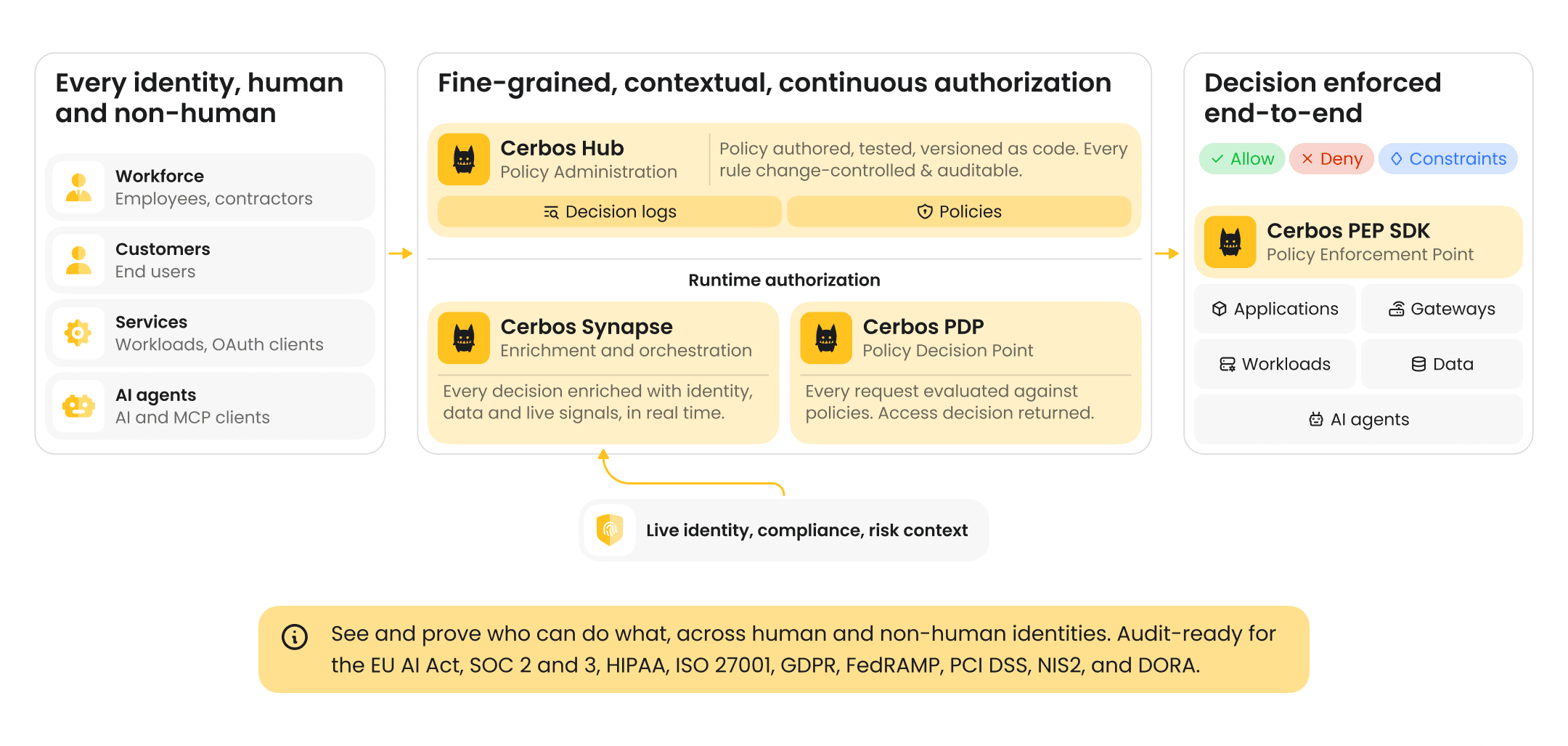
Having made the case for dynamic, fine-grained permissions, the next question is: How do we implement this effectively for MCP? This is where a solution like Cerbos comes in. Cerbos is an authorization solution designed for exactly these kinds of challenges - it externalizes and evaluates policies so your app, or MCP server, doesn’t have to hardcode the rules.
The MCP server simply becomes a policy enforcement point: it asks Cerbos for a decision and abides by it. By externalizing this, you gain a huge amount of control and agility - update policies on the fly, reuse the same policies across many tools or even across different applications, and log every access decision.
Next, let’s bring this to life with a few concrete scenarios of how MCP permissions can be managed with Cerbos in real-world contexts.
Real-world scenarios - securing MCP permissions
Let’s consider a few scenarios where an AI agent uses tools via MCP, and see how Cerbos-enforced permissions make things safer.
AI DevOps assistant with shell access
Imagine you have an AI agent integrated into your DevOps chat, capable of running certain shell commands to help diagnose issues or fetch logs. This is extremely powerful - and dangerous if misused. With MCP, you might expose a shell tool that the agent can call with a command. Using Cerbos, you would lock this down heavily.
For instance, only users with an “SRE” or “DevOps” role might even have this tool enabled; anyone else’s agent wouldn’t see or be able to invoke it. Even for those allowed, you could enforce that only read-only or whitelisted commands are permitted. Perhaps the policy checks the command string and disallows keywords like rm, chmod, or network utilities unless an elevated flag is present. The Cerbos policy could reference an attribute like toolArgs.command and effect DENY if it matches a forbidden pattern, except if the user role is “admin”.
In practice, when the AI tries to execute shell("rm -rf /tmp/...") for a basic user, Cerbos would deny it and the MCP server would refuse - preventing a potentially catastrophic action.
Meanwhile, a command like shell("cat /var/log/app.log") might be allowed for a user with log-read permissions.
All such attempts and results are logged. This fine-grained control means the AI can be genuinely useful by reading logs automatically, without handing it unrestricted server access. It’s the least privilege principle: even though the MCP server could run any command, it will only run approved ones based on policy.
Financial report generator agent
Consider a financial analyst AI that can pull data from various internal APIs , such as account balances, transaction ledgers, HR data for budgets, etc., to compile a report. You might have MCP servers wrapping each internal API. One for the finance database, one for HR system, one for a third-party billing service.
Now, not every user of this AI should see all data - a manager might only see their department’s financials, while a CFO can see everything. Cerbos policies can enforce these scopes at the data level. For example, for the finance API tool, the policy might allow action “view_account” only if resource.account.department == user.department or if the user has the CFO role. So when the AI agent (on behalf of a manager) tries to fetch company-wide finance data, Cerbos will deny those requests where the department doesn’t match.
The result is the AI might respond with, “Sorry, I’m not allowed to access that data,” or simply omit it - which is exactly what should happen for privacy and compliance.
Another angle: you could restrict which tools the agent can use based on context. Maybe after hours, the policy doesn’t allow financial transfer tools at all, as a precaution (deny if current time is outside business hours). Or if an unusual pattern is detected - the AI requesting an unusual combination of HR and finance data - the policy could flag it for additional approval. These are advanced cases, but doable with attribute-based rules.
The key point is, using Cerbos, each API call the AI makes goes through a check that considers the user’s identity and the specifics of the request. The CFO’s AI agent sails through, because she has broad access, but a junior analyst’s AI agent gets politely constrained to just their allowed slice of data.
SaaS application with AI assistant tools
Let’s say you run a SaaS platform, and you’ve added an AI helper that can perform certain in-app actions for users, like creating a project, adding a user to a team, generating an API key, etc., via MCP tools. Your platform already has roles and permissions for normal users. By integrating Cerbos, you can reuse those same permission definitions for the AI agent.
For example, if a user has “viewer” role in your app, and they ask the AI assistant to create a new project, which normally requires an “editor” role, the assistant’s attempt will be denied by policy - the AI will respond with something like “Sorry, I don’t have permission to do that for you.” Under the hood, what happened is the MCP server for “project management” tools asked Cerbos, “Can user X create_project on resource Y?” and Cerbos applied the same logic as if the user clicked a button themselves.
This consistency is important: it prevents privilege escalation through the AI channel. Without such a check, a read-only user might trick the AI, via a clever prompt, into performing an admin-only action.
Another example in this scenario is multi-step tools: maybe the AI can orchestrate a workflow, like backup and then delete some data. If the user isn’t allowed to delete, the policy will block that step - ensuring the AI can’t side-step protections by bundling actions. The result is a delegated AI agent that truly operates with the user’s rights, no more, no less, much like an OAuth app would.
In each of these scenarios, Cerbos is quietly working behind the scenes. The AI doesn’t “know” about Cerbos; it simply encounters success or failure when attempting something. The developers of the MCP server and the policy authors collaborate to decide the rules. Importantly, if something goes wrong - say the AI tries a forbidden action - it’s not a silent failure. Cerbos will log the deny decision.
Your ops team could configure that certain critical denials trigger alerts (e.g., an AI trying to access another user’s data might warrant a security review). This ties into having an incident readiness plan: because you have centralized control, you also have the ability to respond quickly. For instance, if a zero-day exploit is reported in a certain tool, you could globally disable that tool via policy in seconds, cutting off AI access to it until a fix is in place. This kind of kill-switch ability is incredibly valuable when managing a fleet of AI agent capabilities.
Conclusion
We’re excited about AI agents, but ultimately responsible for keeping systems safe. So we would like to leave you with this: MCP unlocks incredible potential by letting AI agents act on our behalf, but with great power comes great responsibility (and the need for great permissions).
“MCP permissions” might not be the greatest term, but it’s the linchpin that determines whether your AI integrations remain secure and trustworthy. By adopting a fine-grained, dynamic authorization model - using tools like Cerbos to externalize and manage your policies - you can confidently expose powerful tools to AI agents. You’ll do so knowing that every action is checked, every access is justified, and nothing is allowed by accident or oversight.
In the end, securing AI agent access isn’t just about preventing disaster - it’s also an enabler. When you have confidence in your permission framework, you can integrate AI deeper into your systems, automate more tasks, and innovate faster, without constantly worrying about the “what ifs.”
MCP permissions are going to become a key topic as more organizations deploy AI copilots and autonomous agents. By getting ahead of the curve and implementing fine-grained authorization now, you position your team to leverage AI safely.
If you’re keen to learn more or to see a concrete example, have a look at our demo on dynamic authorization for AI agents in MCP servers. If you are interested in implementing authorization for MCP servers - try out Cerbos or book a call with a Cerbos engineer to see how our solution can help you safely expose tools to agents without compromising control, reliability, or auditability.