
Authorization for Python applications
Integrate Cerbos with your application and make authorization checks with a simple API call in your codebase using the Python SDK.

Native Python SDK
Checking authorization is as simple as calling a function in Python which simplifies your code

Leverage context
Include request context attributes in the authorization logic to enable more contextual access controls

Keep up to date
Cerbos SDKs are kept up to date with the latest features and improvements
What is Cerbos?
Cerbos is an enterprise authorization solution built to secure access across complex, distributed environments, SaaS products, and regulated systems.
It externalizes authorization logic from application code, making access control consistent and centrally managed across all your services. Instead of scattering permission checks throughout your codebase, you make a single API call to the Cerbos PDP.
Authorization policies are written in human-readable YAML supporting RBAC, ABAC, and conditional rules. They live outside your application and can be updated, tested, and deployed independently.
The Python SDK makes integrating Cerbos straightforward, checking authorization is as simple as calling a function, and the stateless PDP scales horizontally with your infrastructure.
Building fine-grained access control for a Python app
If your application is written in Python there are a number of ways you could approach user permissions. Most commonly, permissions are hard-coded rules written directly into the codebase. The logic will have specific actions that can be allowed or denied to specific user groups, similar to an RBAC (role-based access control) model. There are also open source libraries like Casbin which provide middleware for access controls in Python using ACL, RBAC, and ABAC.
But hard-coded access controls are prone to accumulating technical debt, and can turn into a critical security risk as a result. To prevent that technical debt, it’s important to make authorization easy to maintain. But to prevent security vulnerabilities, you also need to make authorization as fine-grained as possible, ensuring least-privilege access is instated for all users.
How to integrate Cerbos with a Python application
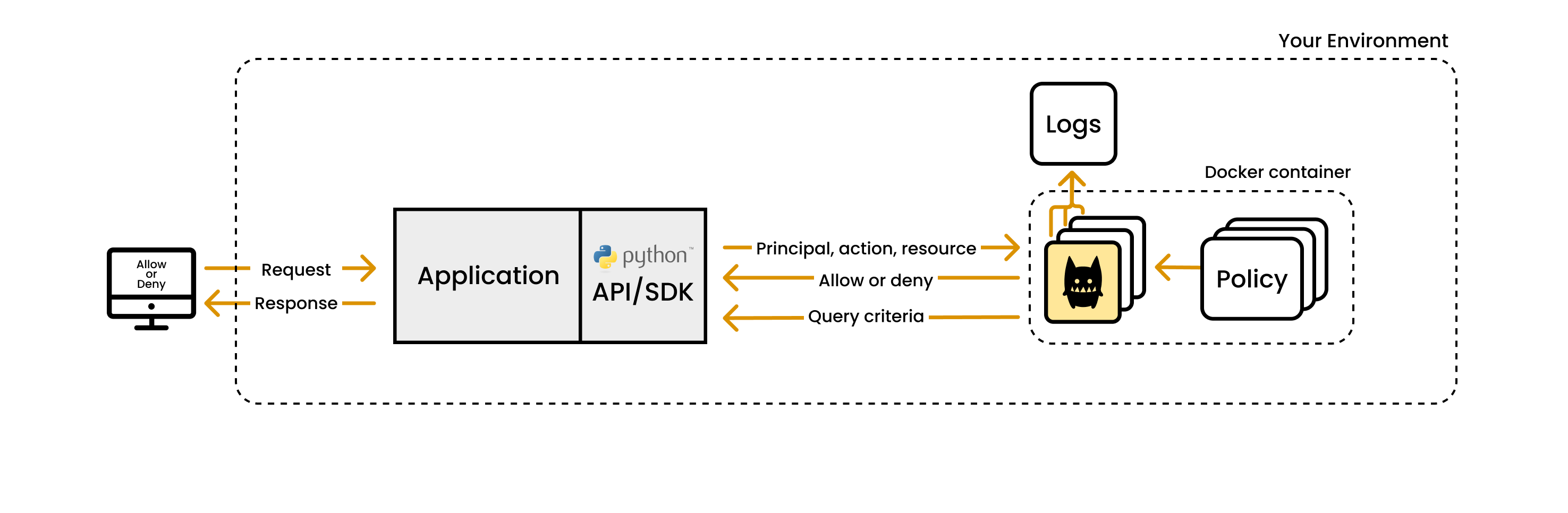
Follow these steps to implement Cerbos in your Python application:
Step 1: Deploy the Cerbos Policy Decision Point service
The Cerbos PDP is available as a container or a binary supporting various different operating systems and architectures. For a list of all available downloads, please visit our releases page on GitHub.
Step 2: Install the Cerbos SDK for Python
You can install the Cerbos Python SDK via pip install cerbos.
Step 3: Sign in to Cerbos Hub (optional)
Signing up to Cerbos Hub is free and makes it easier to work collaboratively on authorization with teammates and centralize authorization management. When you sign up you will be prompted to create an organization and a workspace, to which you will connect a Github repository. Your PDP instances can then be configured to load their policies from Cerbos Hub which will keep them in sync and up to date.
Step 4: Define roles and permissions policies
Cerbos policies are written in YAML. They define who is granted access to which resources under which conditions and can be versioned like any other application asset.
Step 5: Create a configuration file for Cerbos PDP
Once your policies are defined, your PDP instances can be configured to load the policies and make decisions based on them.
If you signed up to Cerbos Hub there are built-in tools to help you write and test access control policies. You can also use our Quick Start guide to set up a PDP without Hub and read policies from a folder or git repository.
Step 6: Integrate Cerbos into your application
Create an instance of the Cerbo SDK client in your application, define the endpoint to reach the PDP, and then replace the authorization logic in your code with SDK calls to check permissions. Your application simply needs to handle an ALLOW or DENY decision with no need to hardcode any authorization logic.
Step 7 - Iterate on the authorization policies without changing code
When your requirements change, it only takes a few minutes to update your policies in either Cerbos Hub or your local policy repository. Permission checks performed in your application continue unhindered as the updates are applied automatically.
FAQ
How do I use the Cerbos Python SDK?
Install the SDK package, point it at your Cerbos PDP instance, and call the check function with the principal (user), resource, and action. The SDK handles serialization, transport, and response parsing.
Is the Python SDK open source?
Yes. All Cerbos SDKs are open source and available on GitHub. They are actively maintained and kept up to date with the latest Cerbos PDP features.
Related integrations
View all integrations →



Cerbos + Python
- Authorization check via a single function call in Python
- Policies evolve independently of application code
- Full audit trail for every authorization decision
- Stateless PDP instances scale horizontally