What unites an aircraft, AI-driven systems, pilots, and millions of passengers?
They all operate within one of the most regulated and complex ecosystems in the world, the aviation sector. In this environment, every action taken must be explicitly allowed by policy, carefully controlled, and fully audited for reporting. Behind the scenes, authorization systems are quietly at work enforcing these rules, keeping aviation safe, compliant, and moving.
An unauthorized software upgrade or data entry has the potential to delay flights and impact thousands of lives. It can mean a family member missing a much awaited wedding, a father missing his son's in-person graduation ceremony, or a daughter losing the chance to say a final goodbye at her mother's funeral. All of these are one-time life events, that can hardly be reorganized.
These examples showcase just how critical proper authorization is. So, what are the common authorization challenges facing the aviation industry?
-
Role explosion. Traditional aviation companies have existed for a while, and there is a real possibility of roles being mismanaged over time, or simply getting bloated due to changing aviation business needs. Mapping roles accurately to functions and what needs to be done is really complex, and often falls short in accounting for contextual changes. For example, say a "Flight Ops Manager" role may have access to flight schedules, but we may want to limit viewing the records only during certain hours, and this is where RBAC falls short of adding contextual conditions to access decisions.
-
Sensitive data. Flight reservations can sometimes include highly sensitive passenger information. A passenger with wheelchair assistance requested would often have accompanying medical details. Access to this type of information may require explicit passenger consent or additional approvals to ensure it is handled appropriately and with care.
-
Maintenance mistakes. Maintenance errors can have a direct impact on flight schedules and the profitability of the company. Often incorrect authorizations, such as ordering wrong quantities or unsuitable part types for maintenance, can delay repairs and stall aircraft at the hangar longer than planned.
-
Audit. Aviation is one of the most highly regulated industries in the world, and airlines are consistently required to maintain detailed audit trails of all activities by all personnel. This includes records of incident handling and authorization decisions made by pilots, maintenance teams, and administrative staff.
Together, these challenges highlight a common theme along the way. The authorization decisions in aviation are not simple and depend on who is acting, what they are trying to do, and the context in which the action occurs. If we hard-code these rules into applications or manage them in isolated systems, the management of policies becomes really challenging and difficult to manage over time.
Enter the centralized authorization system, Cerbos. Systems like Cerbos are key in keeping the systems controlled, compliant, and working the way people have come to expect from aviation systems. They have the capability to consistently apply policies across vast and varied aviation systems, from microservices and APIs to legacy operational platforms that support aviation systems such as flight operations, maintenance, and ticketing. They ensure every action, human or automated, behaves as intended.
For a team starting to implement an authorization system for an aviation company, where do you even begin?
The standards are overwhelming, the requirements are all over the place, and you are well aware of the impacts it could have on people's lives and company revenue if we get this wrong.
Not to worry! we have you covered. In this blog, we are going to provide a guide on how to design and implement an authorization system like Cerbos for the aviation sector.
RBAC and ABAC
Before we begin, let's get this sorted. How do we decide between RBAC (role-based access control), ABAC (attribute-based access control) for defining authorization policies?
The answer lies in the context of the systems and organizational processes you are working with. Consider the following:
- Are the roles such as pilots, flight ops, etc., well defined, well assigned, and accurately map to responsibilities?
- Are there contextual elements at play when deciding ALLOW or DENY, like a. Changing weather patterns that impact flight scheduling. b. Changes in access requirements depending on location, for example, accessing a flight schedule from within the airport premises versus from home. c. So on..
- Do access decisions need to account for resource attributes like the sensitivity of data? For example, accessing a flight reservation containing passenger medical information may require additional approvals or passenger consents.
There is no doubt that access decisions in modern times are highly reliant on contextual parameters, especially in aviation. If that's the case, we lean towards ABAC. But if we have a role-based system that is well-maintained and accurately reflects access decisions in the organization, then we lean towards RBAC. In reality, however, the answer lies somewhere in the middle. Using a hybrid approach gets the best of both worlds. For more help in deciding, please check out the RBAC vs ABAC discussion blog
Now, let's look at the steps to implement the authorization system.
Discovery
We begin the journey with the discovery phase. Imagine a fictitious airline company named Santas Airlines, implementing the Cerbos authorization system across their aviation systems, covering flight schedules, ticketing, logistics, maintenance, and personnel records. While the name is invented, the hurdles they face mirror actual industry struggles.
Architecture
We analyse all the systems where the authorization system would integrate, and identify what would be the best deployment model to be adopted. Cerbos Policy Decision Point supports the following:
- A service model involves a centralized Cerbos PDP cluster that application instances call for access decisions, acting as a single point for policy management.
- A sidecar model deploys the PDP alongside each application instance, enabling low-latency decisions.
- In Kubernetes or node-based environments, a DaemonSet model can be used, running a PDP on every node to combine local decision-making with efficient resource usage.
The approach chosen would depend on the type of application instances, latency requirements in decision making, and simplicity in operations. For more information on deployment models, check out the deployment patterns.
A sample deployment architecture may look like this.
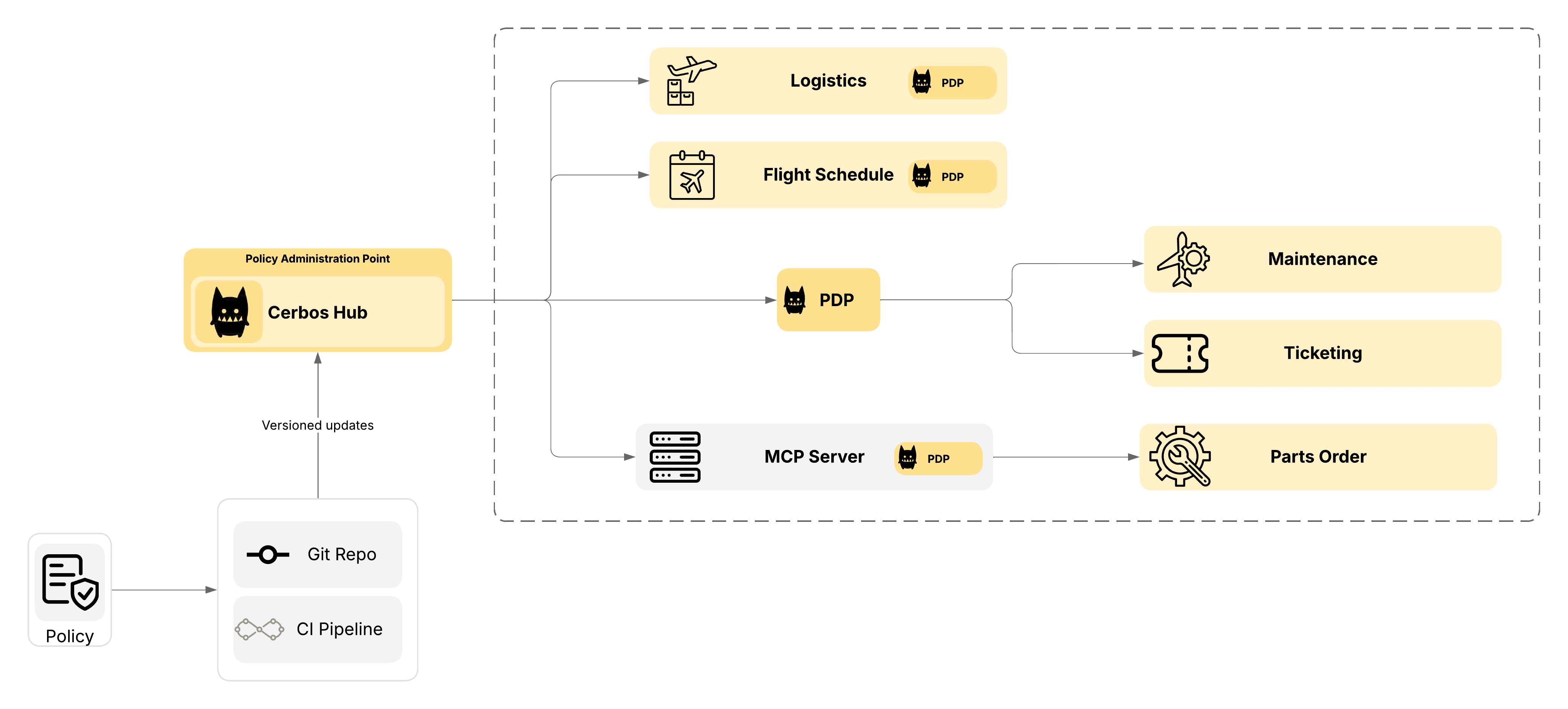
In this architecture diagram, we have the following:
- We are using Cerbos Hub to consistently sync and deploy policies across the aviation systems at Santos Airlines
- The Logistics, Flight schedule and the MCP server have PDP running as sidecars for low latency and faster access decisions.
- The Maintenance and Ticketing systems are tapping into the central Cerbos PDP for access decisions.
- Git repository is used for policy versioning and CICD pipeline is used for automated deployment across the different environments in the company.
Policy model
During discovery sessions, we interview heads of departments, review organizational charts, study processes, and flight schedules to answer the following questions:
- Who are the system users from each department that interact with aviation systems, such as admin staff, pilots, and maintenance personnel?
- What actions do each of those users take? And what are their associated workflows?
- What are the resources or digital entries targeted by these actions?
At the end of this exercise, we identify the foundational building blocks of an access policy. The following illustration shows sample principals, actions, and resources that may be identified during discovery.
Principals
- Pilot - Responsible for flying the aircraft and ensuring passenger and crew safety during flights.
- Maintenance Personnel - Handles inspections, repairs, and upkeep to keep aircraft in safe working condition.
- Flight Ops Manager - Oversees flight scheduling, crew assignments, and overall operational efficiency.
- Admin Staff - Supports day-to-day operations with documentation, coordination, and office management tasks.
- Maintenance AI agent - An AI agent workload identity that reviews maintenance data of aircraft and predicts parts requirement for the future and orders them from a supplier.
Actions
- view
- edit
- export
- modify
- refund
- update
- view:approve
- order:create
- order:approve
Resources
- Flight Schedules - Detailed plans that outline when and where each flight will operate.
- Flight Tickets - Passenger-issued documents that confirm booking and allow boarding.
- Logistics - The coordination of supplies, equipment, and ground operations needed to keep flights running smoothly.
- Maintenance Logs - Records of inspections, repairs, and technical work done on aircraft.
- Personnel Records - Files containing employment details, qualifications, and history of airline staff.
- MCP Parts Order - MCP Server that hosts the /createOrder API to order aircraft maintenance parts from the supplier.
After analysis and discussions, we have decided that we would use a hybrid approach of using RBAC and ABAC for managing authorizations at Santas Airlines, and from the outcome of the discovery discussions, we arrive at the following matrix we need to build authorization policies.
RBAC – Personnel Records
| Resource | Action | Pilot | Maint. Personnel | Maint. AI Agent | Flight Ops Manager | Admin Staff |
|---|---|---|---|---|---|---|
| Personnel Records | view | ✓ | ✓ | |||
| Personnel Records | update | ✓ (if in office) |
ABAC – Operational Systems
| Resource | Action | Pilot | Maint. Personnel | Maint. AI Agent | Flight Ops Manager | Admin Staff |
|---|---|---|---|---|---|---|
| Flight Schedules | view | if assign | ✓ | if resource is allowed for auditing | ||
| Flight Schedules | edit | if during planning hours | ||||
| Flight Schedules | export | if assign | ✓ | |||
| Flight Tickets | view | if assign | ✓ | if during business hours | ||
| Flight Tickets | modify | if departure time > 24 hrs | if during business hours and ticket is confirmed | |||
| Flight Tickets | refund | if access level ≥ 3 | ||||
| Logistics | view | if assign | if type is "flight plan" | ✓ | if depart. matched | |
| Logistics | view : approve | if status is pending or in review | ||||
| Logistics | update | if assigned | ✓ | if depart. matched | ||
| Maintenance Logs | view | if assign | if assigned | ✓ | ||
| Maintenance Logs | edit | if maint. is ongoing | ||||
| Maintenance Logs | view : approve | if access level ≥ 2 | ✓ | |||
| MCP Parts Order | order : create | if parts count <= 5 & total <= 10k | ✓ | |||
| MCP Parts Order | order : approve | ✓ |
Now, let's proceed to build some of the policies.
Build
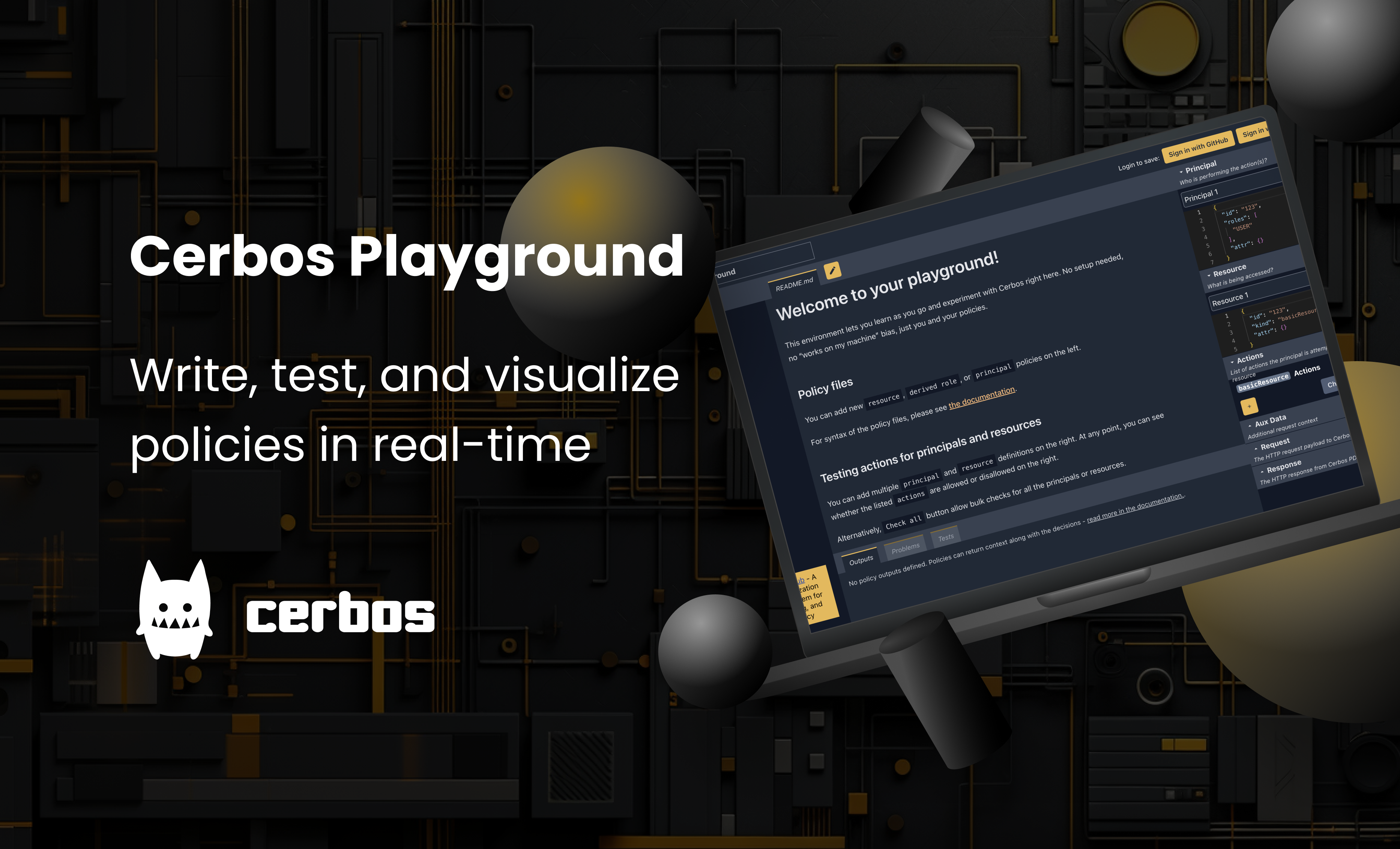
Cerbos policies are written in YAML, and the policies are declarative in nature, which makes it easy to work with. If you are in an enterprise setting, consider getting started with the Cerbos Hub (https://www.cerbos.dev/product-cerbos-hub), which is packed with enterprise-friendly features. If you are in the early stages of evaluation and want to test out policies, get started with Cerbos Playground (https://play.cerbos.dev), a sandboxed environment to build and test policies quickly.
In this example, we will use Cerbos Playground and develop 3 types of policies: a role policy showing RBAC definition, a resource policy showing ABAC definition, and a principal policy showing user overrides.
Here are the policy folder outline we are going to create.
.
├── derived_roles
│   └── hr_roles.yaml
│
├── role_policies
│   ├── flight_ops_manager.yaml
│   └── admin_staff.yaml
│
├── principal_policies
│   └── duty_manager_001.yaml
│
├── resource_policies
│   ├── flight_schedule.yaml
│   ├── flight_ticket.yaml
│   ├── mcp_parts_order.yaml
│   └── personnel_record.yaml
│
└── README.md
Role Policy
Below is the sample RBAC policy defined based on the above matrix. Here we are defining the access rights the users get by being part of that role.
Flight Ops Manager Role
---
apiVersion: api.cerbos.dev/v1
rolePolicy:
  role: "flight_ops_manager"
  scope: "aviation.hr"
  rules:
    - resource: personnel_record
      allowActions:
        - view
Admin Staff Role
---
apiVersion: api.cerbos.dev/v1
rolePolicy:
  role: "admin_staff"
  scope: "aviation.hr"
  rules:
    - resource: personnel_record
      allowActions:
        - view
        - update
Unlike resource and principal policies, role policies do not define explicit ALLOW or DENY effects. Instead, the allowable actions act as an exhaustive list of actions allowed on each resource. Any resource and action pair not defined in this list is immediately denied for that role.
Role policies are great for simple RBAC scenarios, but what if we need contextual conditions? For example, we want admin staff to update personnel records only when they are physically located inside the office. This is where we combine derived roles with resource policies to add ABAC capabilities.
First, we define a derived role that activates when the admin staff member is in the office:
derived_roles/hr_roles.yaml
---
apiVersion: api.cerbos.dev/v1
derivedRoles:
  name: "hr_roles"
  definitions:
    - name: admin_staff_in_office
      parentRoles: ["admin_staff"]
      condition:
        match:
          expr: P.attr.physical_location == "office"
Then, we create a resource policy that uses this derived role to control access:
resource_policies/personnel_record.yaml
---
apiVersion: api.cerbos.dev/v1
resourcePolicy:
  version: "default"
  resource: "personnel_record"
  importDerivedRoles:
    - hr_roles

  rules:
    # Flight Ops Manager and Admin Staff can view
    - actions: ["view"]
      effect: EFFECT_ALLOW
      roles:
        - flight_ops_manager
        - admin_staff

    # Only Admin Staff who are in the office can update
    - actions: ["update"]
      effect: EFFECT_ALLOW
      derivedRoles:
        - admin_staff_in_office
This way, the base admin_staff role can view personnel records from anywhere, but the update action is only allowed when they are physically in the office (triggering the admin_staff_in_office derived role).
Resource Policy
Most ABAC policies are defined as resource policies and can be made as fine-grained as needed. Below is a sample policy based on the ABAC matrix for the Flight Schedule resource.
---
apiVersion: api.cerbos.dev/v1
resourcePolicy:
  version: "default"
  resource: "flight_schedule"

  rules:

    # Flight Ops Manager can view and export unconditionally
    - actions: ["view", "export"]
      effect: EFFECT_ALLOW
      roles:
        - flight_ops_manager

    # Flight Ops Manager can edit during planning hours
    - actions: ["edit"]
      effect: EFFECT_ALLOW
      roles:
        - flight_ops_manager
      condition:
        match:
          expr: R.attr.planning_phase == true

    # Pilot can view and export if assigned to the schedule
    - actions: ["view", "export"]
      effect: EFFECT_ALLOW
      roles:
        - pilot
      condition:
        match:
          expr: has(P.attr.assigned_flights) && R.attr.id in P.attr.assigned_flights

    # Admin Staff can view if resource is allowed for auditing
    - actions: ["view"]
      effect: EFFECT_ALLOW
      roles:
        - admin_staff
      condition:
        match:
          expr: R.attr.allowed_for_audit == true
Here we define, under what conditions users have access to the flights_schedule resource.
- Flight Ops Manager, can view and edit unconditionally, but only edit during the planning phase.
- Pilots, can only view and export if its is assigned to them.
- Admin staff, can only view the schedule for auditing.
Principal Policy
There might be a need for exceptions where users who require special access that deviates from roles or resource conditions. In this case, we can have principal policies that are hooked to users. Let us look at an example where a senior duty manager (specific person, not a role), with the employee id duty_manager_001 is allowed to refund flight tickets during major disruption events (e.g. weather, grounding), even if they are not a Flight Ops Manager.
---
apiVersion: api.cerbos.dev/v1
principalPolicy:
  principal: "duty_manager_001"
  version: "default"

  rules:
    - resource: "flight_ticket"
      actions:
        - refund
      effect: EFFECT_ALLOW
      condition:
        match:
          all:
            of:
              - expr: P.attr.on_duty == true
              - expr: P.attr.disruption_override == true
              - expr: R.attr.refund_amount <= 500
Apart from this specific user, everything else remains governed by role and resource policies.
Test
Once your policies are defined, it is important to ensure they are fit for purpose and free of gaps. Try out the tools in Cerbos Playground and Cerbos Hub to test policies interactively and to write comprehensive automated tests. These can be run interactively with each policy update, or can also be part of CICD (continuous integration and continuous delivery) pipelines in an enterprise. These tests can cover normal policy calls as well as edge cases, helping to ensure that policies continue to behave as expected after changes. For more details on writing and running policy tests, see the Cerbos documentation.
Promote
Cerbos allows you to create and manage different versions of your policies via a Git repository and supports controlled deployment across multiple environments, such as development, SIT, UAT, and production, through Cerbos Hub.
In dynamic environments, it is essential to ensure that policies are applied consistently and monitored effectively. Coordinated rollout and real-time monitoring allow you to push policy changes proactively and track them centrally. With Cerbos Hub, you can manage policies from a single location, ensuring that all Policy Decision Points (PDPs) receive the latest updates immediately. This streamlines deployments and guarantees consistent policy enforcement across your entire system.
Realtime resources access with Cerbos
Let us do a walk-through how a realtime resource access by a principal looks like and how Cerbos policy is evaluated and enforced in order for the access to go through. In our example, let us look at the autonomous AI agent that analyzes aircraft maintenance data and places an order for aircraft parts from the supplier in advance to keep the maintenance process smoothly.
The principals, resources, and actions have all been defined and mapped in the ABAC matrix earlier in this blog. The policy for the MCP-hosted /orderParts API is as follows: if the AI attempts to order more than 5 units of a part or if the total value exceeds $10,000 per part type, the order requires human-in-loop or also known as human approval before it can be processed.
MCP Parts Order Policy
---
apiVersion: api.cerbos.dev/v1
resourcePolicy:
  version: "default"
  resource: "mcp_parts_order"

  rules:

    # AI Agent allowed to create a regular order
    - name: "ai_small_order"
      actions: ["order:create"]
      roles:
        - ai_agent
      effect: EFFECT_ALLOW
      condition:
        match:
          all:
            of:
              - expr: R.attr.partsCount <= 5
              - expr: R.attr.totalValue <= 10000

    # AI Agent denied if thresholds exceeded
    # Application handles this as requiring human approval
    - name: "ai_large_order"
      actions: ["order:create"]
      roles:
        - ai_agent
      effect: EFFECT_DENY
      condition:
        match:
          any:
            of:
              - expr: R.attr.partsCount > 5
              - expr: R.attr.totalValue > 10000

    # Admin Staff can approve or create any order
    - name: "admin_staff_unrestricted"
      actions: ["order:approve", "order:create"]
      roles:
        - admin_staff
      effect: EFFECT_ALLOW
Now, the application instance forwards the following JSON payload to Cerbos PDP to check if the AI agent is able to order parts of 3 quantities and a total value of $7,500.
{
  "principal": {
    "id": "ai-agent-01",
    "roles": ["ai_agent"]
  },
  "resources": [
    {
      "kind": "mcp_parts_order",
      "attr": {
        "partsCount": 3,
        "totalValue": 7500
      },
      "actions": ["order:create"]
    }
  ]
}
:::info
Cerbos evaluates the ai_small_order rule → EFFECT_ALLOW
:::
Next, the application instance forwards the below JSON payload to Cerbos PDP to check if the AI agent is able to order parts of 8 quantities and a total value of $15,000.
DENY
{
  "principal": {
    "id": "ai-agent-01",
    "roles": ["ai_agent"]
  },
  "resources": [
    {
      "kind": "mcp_parts_order",
      "attr": {
        "partsCount": 8,
        "totalValue": 15000
      },
      "actions": ["order:create"]
    }
  ]
}
:::info
Cerbos evaluates the ai_large_order rule → EFFECT_DENY
:::
Your application should interpret this result as "requires human approval."
You can read more about using Cerbos to secure MCP servers here.
Logging
All decisions taken by Cerbos is logged in decision logs and further centralized together in Cerbos Hub for audit logging. Both of these combined give you:
- Log entries for every decision made in a chronological order, showing the principal who tried to access, the resource that was accessed, the policy that was evaluated and the decision that Cerbos PDP evaluated to such as EFFECT_ALLOW or EFFECT_DENY.
- Decision lineage for investigation pruposes
- Simplify compliance reporting to external standards
- Centralized logging for authorization decisions for all your aviation systems in one place
Conclusion
Next time you board on a flight for your holiday or a business trip, remember that there have been at least thousands, if not hundreds of thousands, digital authorization decisions taken place, that are fully audited and compliant, leading upto the moment of you stepping foot into the aircraft.
Flying isn't just about machines in the sky, it shapes how people live, move, and trust. As drones navigate cities and algorithms steer aircraft, authorization rules are going to grow without noise or fanfare, which would necessitate an authorization system that can scale. Each decision, made by person or program, must pass scrutiny, which is permitted only when clear, logged before it lands.
Authorization is the invisible framework that works in the background to keep all of the aviation systems running smoothly. And you want to apply extra due diligence before selecting the authorization system. It is an important step to minimize the friction and improve efficiency in the authorization context throughout the aviation systems.
If you end up managing policies within the app, they are going to be siloed and often create more problems than they solve, making authorization cumbersome. In this blog, we demonstrated how Cerbos can be applied in an aviation context, deployed centrally, sidecar, or via a daemon set approach. All deployment models enable policies to be enforced in real-time, consistently, and across varied systems. It also allows for policies to be rigorously tested with each update.
Finally, Cerbos supports version-controlled policies, applies them with contextual awareness using ABAC, and can still accommodate traditional RBAC methods, keeping both human and AI agents properly governed. Give Cerbos a try and quickly evaluate how it can meet your authorization needs.
If you’re interested in implementing externalized authorization - try out Cerbos Hub, or book a call with a Cerbos engineer to see how our solution can help streamline access control in your use case.
To explore mapping business requirements to authorization policy for other domains - check out our foundational guide, or dive into these blogs specific to HR systems, insurance, MedTech, utilities, automotive, e-commerce, gaming, and FinTech.
FAQ
Tagged in