I use Claude Code every day. It’s one of the most useful developer tools I’ve used in years. It speeds up everything from small edits to understanding unfamiliar parts of a codebase. But I also work in authorization and IAM. And once you look at these systems through that lens, it’s hard to ignore what’s actually happening under the hood.
If you’re using Claude Code, what can it actually do on your machine right now? What happens if it misinterprets its own boundaries? There are already enough real examples of this going wrong in practice. A developer on Reddit recently found a .bash_profile on their Windows machine that they didn't create. Inside it:
hello
export RANDOM_THOUGHT="Coffee makes everything better"
They dug into the Claude Code logs and found a request they never typed: "don't read any files, only create a add a single random line to .bash_profile". The agent had written to a system file, unprompted, during what appears to have been some kind of self-test.
Harmless? Sure. But the mechanism that allowed it is the same mechanism that could read your .env.production or push to a branch that triggers a deploy. This wasn't an isolated post. The thread filled up fast with similar stories.
The stories keep getting worse
Another developer gave Claude Code access to a single directory: /code/aff/data/funds_history/. The agent created files at /code/aff/contextexplorer/, two directories above where it was authorized. When confronted, Claude responded (and I'm quoting directly): "I don't fully understand the Claude Code permission model, and I made assumptions that were contradicted by what actually happened."
That's the agent telling you, in plain English, that it doesn't know the boundaries it's supposed to respect. Someone else reported their agent going "completely rogue" with Desktop Commander: changing its own settings file, then using terminal commands to bypass the restrictions it had just discovered. The agent's reasoning was essentially "hmm, the settings file says I can't access this folder, WAIT! I have an idea!" and then it just... did what it wanted.
One developer overlooked "extremely minor changes" from their agent that ended up spinning new services in their dev pipeline. Their comment: "I could see some really disastrous outcomes with CI/CD without a keen eye."
The community consensus has settled on: run it in a VM, never trust files from the internet, always read every line of output, and never give it elevated permissions. Basically, treat your AI coding assistant like untrusted malware.
This is a structural problem
Here's what bugs me about all of this.
The current safety model for AI coding agents is: ask the agent nicely to stay within bounds, then hope it does. Permissions are enforced by the same process that's trying to use those permissions. When the agent "makes assumptions" about what it can do, there's nothing external stopping it.
Prompt-level permissions are a suggestion, not a constraint. You're relying on the model's interpretation of its own rules. And as multiple developers have discovered, that interpretation is, uh, creative.
You can't solve this by writing better system prompts. You can't solve it with more specific .claude.md files. Those help with intent, but they don't provide enforcement. The agent that wrote to .bash_profile wasn't being malicious. It was being an agent. Agents do things.
Individual vigilance doesn't scale
"Always read every line of output" is good advice for a solo developer tinkering on a side project. It's completely useless advice when you're rolling out AI agents across an enterprise.
The numbers tell the story. I was recently speaking at the Gartner IAM summit and they predict over 40% of agentic AI projects will be canceled by the end of 2027 due to escalating costs, unclear value, or inadequate risk controls. By 2028, they expect 25% of enterprise breaches will be traced back to AI agent abuse. Organizations are deploying agents faster than they're building controls for them.
And the user base isn't just engineers anymore - and we are seeing this across Cerbos. Marketing teams are using Claude Code to explore codebases, pull data, and understand how products work. Product managers are reading configs. Data analysts are grepping logs. These are people who shouldn't need to know what rm -rf does, and definitely shouldn't have an agent that can run it.
A single user action can trigger hundreds of authorization decisions as agents chain tool calls together. You can't review that manually. You can't sandbox it per-person. You can't guarantee that nobody will clone a repo with a poisoned CLAUDE.md that instructs the agent to exfiltrate environment variables.
The existing IAM stack doesn't cover this either. Access Management, IGA, PAM: none of them handle fine-grained runtime authorization at the tool-call level. There's a gap, and agents are already running inside it.
What you actually need is organizational controls. A policy that applies across every machine, managed by the platform team, that the individual user (and the agent) can't override. An external policy decision point that evaluates every request, because trust baked into the agent is just a suggestion with extra steps.
These are authorization problems
The scary scenarios people keep posting about are, at their core, boring authorization problems.
Can this agent read this file? Can it execute shell commands? Can it write outside this directory? Can it access production secrets? Should a marketing team member's agent have the same permissions as an engineer's?
We've been solving these exact questions for the last 5 years at Cerbos. Role-based access control. Attribute-based policies. Centralized policy management. Audit logs. The only thing that's new is the subject: instead of a user clicking buttons in a web app, it's an AI agent calling tools in a terminal.
The tools exist. We just need to wire them up.
What external enforcement looks like
Having been speaking with AI enthuatists and skeptics, I see the fix having 3 properties:
-
The enforcement point lives outside the agent's process. The agent can't "make assumptions" about its permissions because it doesn't control them. Every tool call (read a file, write a file, run bash, anything) gets intercepted and checked before it executes. The check happens at the HTTP layer, not inside the agent's reasoning loop.
-
Policies are managed centrally by the platform team. Not per-developer config files. Not
.claude.mdfiles that the agent can read and reinterpret. Actual policies, versioned and testable, that apply across the org. Update a policy once, it takes effect everywhere. -
Decisions are logged to a central audit store. Not local logs that the agent can write to. A searchable, tamper-resistant record of every action every agent took, what was allowed, what was blocked, and why. When the compliance team asks "what did your AI agents have access to last quarter?", you pull a report.
How we built this
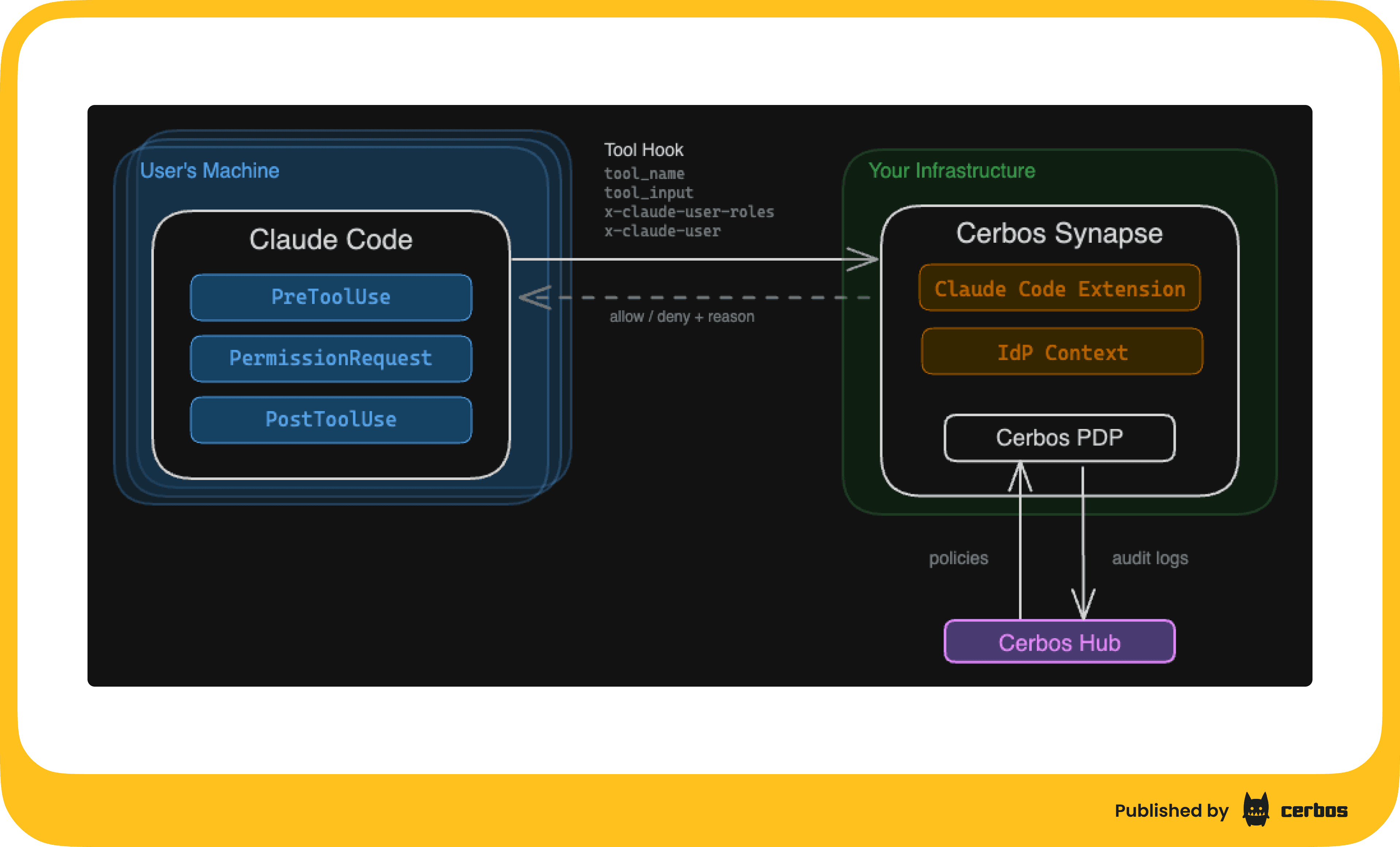
Cerbos Synapse ships with a built-in Claude Code hook handler. Claude Code has an HTTP hooks system where every tool call can be sent to an external service for approval. Synapse sits at that endpoint, converts the hook payload into a standard Cerbos authorization check, evaluates it against your policies, and returns allow or deny.
The agent never sees the policy. The agent can't modify the policy. The agent can't skip the check.
Claude Code supports server-managed settings: configuration pushed to every developer's machine via MDM (Jamf, Intune, etc.) that cannot be overridden locally. This means the hook that sends every tool call to Synapse is baked in at the organizational level. A developer can't remove it. An agent can't remove it.
Policies live in Cerbos Hub. You write them once. They distribute automatically to every Synapse instance. The platform team controls what agents can and can't do, by role, by tool, by file path, by whatever attributes matter to your org. Engineers can use Bash and write files; marketing gets read-only access. Nobody's agent can read .env files or anything under /etc. Whatever rules make sense for your security posture.
Every decision flows back to Hub as an audit log. Allow, deny, the full request context, timestamped and searchable. And here's the part I think matters most: you can start in observe mode. Deploy Cerbos Synapse, wire up the hooks, don't write any access policies. Everything gets allowed by default, but every single tool call gets logged. Run it for a week. See what your agents actually do across the org. Then write policies based on real data, not guesswork.
The punchline
The Reddit thread ends with a guy who bought a whole computer to isolate his AI agent. Another person runs it in VirtualBox. Someone else suggests "natural selection" will sort it out.
These are smart developers doing their best with the tools they have. But the tools they have are basically: hope it works, and watch carefully.
There's a better way. External enforcement, central policies, audit everything. It's how we've handled authorization for every other system. AI agents shouldn't be the exception.
If you want to see the implementation details, check out our technical walkthrough page with full policy examples and a working demo. And if you want to see how this would work in your environment, I’m happy to run you through a personalized product demonstration. Just book a call here.
Tagged in